


IDM UltraFTP 22.0.0.14 (x64)
Category: Apps (SEO/Marketing/Design)
- views: 108
- date: 19 September 2023
- posted by: oaxino
IDM UltraFTP 22.0.0.14 (x64)
File size: 55.6 MB
File size: 55.6 MB
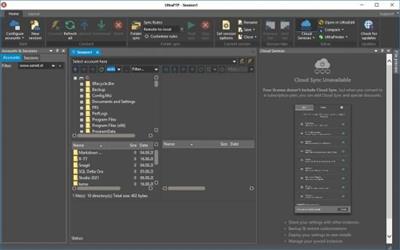
UltraFTP is a personal, stand-alone FTP client built upon the framework of other IDM applications like UltraEdit and UltraCompare. Designed with maximum usability and performance in mind, UltraFTP offers full theme support, session support, an explorer interface, drag-and-drop transfers, and more. Even better, UltraFTP integrates with UltraEdit/UEStudio, UltraCompare, and UltraFinder to provide a seamless editing and publishing experience both on local and remote systems. UltraFTP supports FTP, SFTP, and FTPS protocols.
Threaded transfers for max speed
Slash your transfer time by up to 25%? UltraFTP's threaded transfer architecture is designed with performance in mind. When transferring large batches of files, UltraFTP stands alone, beating out the competition with transfer times up to 25% faster in some cases.
Sync local and FTP folders
Folder sync is a simple and fast way to sync a local folder to an FTP folder. Set your sync rules, review sync actions, change sync actions on a per-file basis...then launch and let UltraFTP do the rest. UltraFTP's blazing fast transfer engine will begin uploading and downloading according to your sync rules.
Synchronized folder browsing
With synced browsing, UltraFTP automatically follows your local or remote navigation in the other pane. This is a very helpful feature if you're working with the same folder structure on both your local system and FTP server.
Preview remote files
Want to take a quick peak at a source file or an image on the remote server...without downloading it first? UltraFTP's integrated File Preview allows you to see your local and remote files without having to open them externally.
Configurable sessions and options
Set overwrite rules, configure double-click behavior, set whether to open files in UltraEdit or UEStudio, set your local and remote start paths...and more. Save your most-used FTP sessions for later use, restoring its settings and properties.
UE, UES, UC integration
UltraFTP integrates seamlessly with other IDM applications. Launch a compare of two or three files or folders in UltraCompare. Edit an FTP file directly in UltraEdit or UEStudio. And best of all, with shared FTP accounts, your FTP sites are accessible in all your IDM applications.
Flexible layout
Maximize your screen space with UltraFTP's layout options. Want to go widescreen? No problem. Only interested in remote? Switch to remote-only view mode. With drag-and-drop support, you can upload files by simply dragging them into the remote pane from Windows File Explorer.
https://www.ultraedit.com/products/ultraftp/latest-changes.htmlHomepage
https://www.ultraedit.com/Download link
rapidgator.net:
uploadgig.com:
nitroflare.com:
We need your support!
Make a donation to help us stay online

Bitcoin (BTC)
bc1q08g9d22cxkawsjlf8etuek2pc9n2a3hs4cdrld

Bitcoin Cash (BCH)
qqvwexzhvgauxq2apgc4j0ewvcak6hh6lsnzmvtkem

Ethereum (ETH)
0xb55513D2c91A6e3c497621644ec99e206CDaf239

Litecoin (LTC)
ltc1qt6g2trfv9tjs4qj68sqc4uf0ukvc9jpnsyt59u

USDT (ERC20)
0xb55513D2c91A6e3c497621644ec99e206CDaf239

USDT (TRC20)
TYdPNrz7v1P9riWBWZ317oBgJueheGjATm
Information |
|||
 |
Users of GUESTS are not allowed to comment this publication. | ||