


Shades Tweaker 1.6
Category: Apps (SEO/Marketing/Design)
- views: 98
- date: 12 September 2023
- posted by: oaxino
File Size : 1.7 Mb
Shades Tweaker is a tool that aims to be a control panel of sorts, where users can more conveniently configure their machine. As for the available modifications, the general behavior of your system, its services, and privacy features can be freely accessed. In addition, the Cleaning menu enables a quick and painless maintenance process.
A third-party control panel for your computer
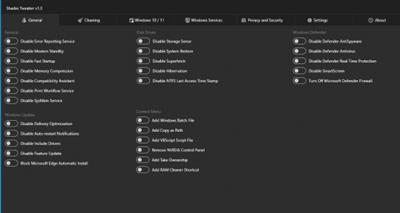
Perhaps that's the best way to go about describing this program. What you get here is essentially a toolbox that provides quick access to a series of functions of interest. The interface will first present you with the General tab, which features a variety of more generalist tweaks.
These tweaks involve toggling certain Windows functions, such as Fast Startup, Modern Standby, modifying how Windows Update works by disabling Delivery Optimization, blocking Microsoft Edge automatic installations, as well as blocking drivers from being installed. Some disk and context menu-related options are likewise available from the same interface.
If you wish to go a little deeper, the Windows 10/11 tab lets you disable certain features of the respective operating systems, such as Cortana, Search Indexing, excluding Bing from Windows Search, and so on.
Do away with telemetry and redundant services
The Privacy and Security tab is the most feature-rich if we're to consider the number of options it puts at your disposal. Through it, you'll be able to disable certain telemetry functions, such as Diagnostics Data and Tracking, Location History, Application Telemetry, and many others.
Some services can be disabled by way of the Services menu. It's best to look up each entry to ensure that you're not deactivating something essential to your workflow, however.
General maintenance can also be conducted
As for maintenance, the Cleaning menu is very interesting in itself. It can rid your system of any superfluous logs, temp files, and cached data. A quick analysis will display the elements that can be dispensed with. That's all well and good, but I would advise users to be careful when cleaning certain caches, though.
All in all, Shades Tweaker is a utility that will serve many users well. The program is easy to pick up and use, but it's best to inform yourself before changing anything you're unfamiliar with. Any modifications I made were applied with no delay, and being able to freely import and export configurations can significantly quicken your work, especially on subsequent Windows installations.
https://github.com/shadesofdeath/ShadesTweaker/releasesHomepage
https://github.com/shadesofdeath/ShadesTweakerDownload link
rapidgator.net:
uploadgig.com:
nitroflare.com:
1dl.net:
We need your support!
Make a donation to help us stay online

Bitcoin (BTC)
bc1q08g9d22cxkawsjlf8etuek2pc9n2a3hs4cdrld

Bitcoin Cash (BCH)
qqvwexzhvgauxq2apgc4j0ewvcak6hh6lsnzmvtkem

Ethereum (ETH)
0xb55513D2c91A6e3c497621644ec99e206CDaf239

Litecoin (LTC)
ltc1qt6g2trfv9tjs4qj68sqc4uf0ukvc9jpnsyt59u

USDT (ERC20)
0xb55513D2c91A6e3c497621644ec99e206CDaf239

USDT (TRC20)
TYdPNrz7v1P9riWBWZ317oBgJueheGjATm
Information |
|||
 |
Users of GUESTS are not allowed to comment this publication. | ||