


Wave Arts Panorama 7 v7.0.5
Category: Apps (SEO/Marketing/Design)
- views: 124
- date: 15 August 2023
- posted by: voska89
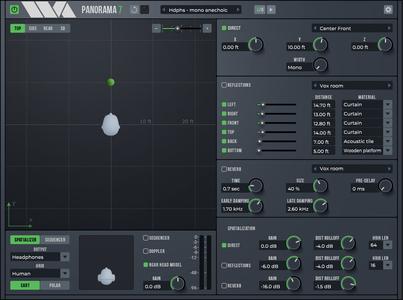
Free Download Wave Arts Panorama 7 v7.0.5 | 10.1 Mb
Panorama is a virtual acoustics processor that can produce stunningly realistic auditory scenes for playback over headphones or loudspeakers. Panorama uses 3-D audio and acoustic environment modeling technology to simulate the acoustics of sound propagation in real spaces.
Panorama has many possible uses, including:
3D audio production. Insert Panorama on each track in a mix, and use Panorama to pan the individual sounds around in the virtual space. This works best for headphone mixes (think of the possibilities for podcasting), but the same concept can be used for loudspeaker playback. You can use the sequencer to set up motion trajectories for the sources, or simply automate them.
Stereo panning effects. In conventional stereo mixes, sometimes you have a sound you want to treat specially. By applying 3D processing, Panorama can be used to create a panning effect that stands out from conventional power panning.
Stereo "auto-pan" effects. Panorama can work as a conventional stereo panner, and it has a powerful sequencer to automate pan positions. Hence you can create all sorts of modulating pan effects.
Stereo widening. Panorama can process stereo mixes to sound very wide when played back over loudspeakers.
Virtual monitoring. Panorama can be used to simulate stereo and surround playback for headphone playback.
Some of what's new in Panorama 7:
The big new feature is the position sequencer, which can be used for trajectory automation and beat-synced musical effects (auto-pan). The sequencer works by panning the sound along a set of trajectory waypoints.
All new UI look with dark theme.
Larger UI area for panning, now including side and rear view options.
Larger virtual area for panning. Previously Panorama 6 allowed from -10 to +10 feet, Panorama 7 allows from -100 to +100 feet.
Zoom in/out control.
Support for SOFA format HRIRs. SOFA (Spatially Oriented Format for Acoustics) is a standard file format used for interchange of head-related impulse responses. Support for SOFA data is provided via a conversion application called Sofa2Pan that converts from SOFA format to Panorama format.
Improved support for third-party HRIRs: HRIRs are specified by filename and are sample rate converted to the session rate when loaded.
Implemented "Near Head Model". This improves reproduction accuracy for positions close to head by applying additional head shadowing based on a spherical head model.
Added "Stereo Pan" HRIR to implement traditional stereo panning.
Added "Stereo Passthru" HRIR to implement proper binaural to loudspeaker conversion.
Home Page-
https://wavearts.com/products/plugins/panorama-7DOWNLOAD LINK
Rapidgator
http://peeplink.in/572ffa6f5074
Uploadgig
nyv7i.Wave.Arts.Panorama.7.v7.0.5.rar
NitroFlare
nyv7i.Wave.Arts.Panorama.7.v7.0.5.rar
Links are Interchangeable - No Password - Single Extraction
We need your support!
Make a donation to help us stay online

Bitcoin (BTC)
bc1q08g9d22cxkawsjlf8etuek2pc9n2a3hs4cdrld

Bitcoin Cash (BCH)
qqvwexzhvgauxq2apgc4j0ewvcak6hh6lsnzmvtkem

Ethereum (ETH)
0xb55513D2c91A6e3c497621644ec99e206CDaf239

Litecoin (LTC)
ltc1qt6g2trfv9tjs4qj68sqc4uf0ukvc9jpnsyt59u

USDT (ERC20)
0xb55513D2c91A6e3c497621644ec99e206CDaf239

USDT (TRC20)
TYdPNrz7v1P9riWBWZ317oBgJueheGjATm
Information |
|||
 |
Users of GUESTS are not allowed to comment this publication. | ||