


ScanTransfer Pro 1.4.5 Multilingual
Category: Apps (SEO/Marketing/Design)
- views: 85
- date: 4 June 2023
- posted by: mitsumi
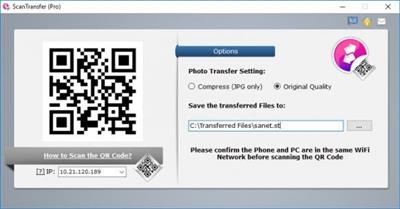
ScanTransfer Pro 1.4.5 Multilingual
File Size: 18.5 MB
File Size: 18.5 MB
ScanTransfer is a clever software that enables you to transfer photos, videos and other files from your phone to your PC via Wi-Fi and without the need to install any app on your phone. ScanTransfer works with iOS and Android phones that have the capability to scan a QR code. You can scan with the iOS camera, Facebook or Twitter app, or any other QR capable app.
Can transfer files from your Android or iPhone wirelessly
First things first, it is worth pointing out that the program supports handsets running either iOS or Android, but you need to pay attention to the requirements before initiating a transfer, otherwise nothing will happen.
Once you ensure your phone and computer are on the same network, you need to look into some options regarding the photo transfer process. To be more specific, you can specify whether you want to keep the original quality of your image or whether you want to compress them. Aside from that, you are asked to indicate the output location.
Only asks you to scan a QR code
Once you are done, you just need to scan the QR code the application prompts you with. If you are using an iPhone, the simplest way of doing that is using your camera.
At this point, you should be able to select the photos and videos you want to transfer either one by one or in bulk. There is no limit as to the number of files you can send from your phone to your computer, and in terms of security, you may want to know that the fact that your data is sent in the local area network ensures your privacy.
During our tests, ScanTransfer behaved flawlessly, and we encountered no issues whatsoever. Its characteristic ease of use and the quick response make it a user-friendly application anyone could benefit from when trying to send files from their mobile device to their PC. Hopefully, however, transferring data the other way around, from the PC, that is, will be possible in the future as well.
Whats New
official site does not provide any info about changes in this version
Homepage:
https://scantransfer.net/Download link
rapidgator.net:
uploadgig.com:
nitroflare.com:
1dl.net:
We need your support!
Make a donation to help us stay online

Bitcoin (BTC)
bc1q08g9d22cxkawsjlf8etuek2pc9n2a3hs4cdrld

Bitcoin Cash (BCH)
qqvwexzhvgauxq2apgc4j0ewvcak6hh6lsnzmvtkem

Ethereum (ETH)
0xb55513D2c91A6e3c497621644ec99e206CDaf239

Litecoin (LTC)
ltc1qt6g2trfv9tjs4qj68sqc4uf0ukvc9jpnsyt59u

USDT (ERC20)
0xb55513D2c91A6e3c497621644ec99e206CDaf239

USDT (TRC20)
TYdPNrz7v1P9riWBWZ317oBgJueheGjATm
Information |
|||
 |
Users of GUESTS are not allowed to comment this publication. | ||