


Microsoft Edge Remover 2.6
Category: Apps (SEO/Marketing/Design)
- views: 85
- date: 18 May 2023
- posted by: oaxino
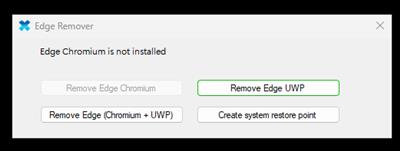
Microsoft Edge Remover 2.6
File Size : 8.4 Mb
File Size : 8.4 Mb
Microsoft Edge Remover, as you might have guessed, is a simple application dedicated to removing your Edge browser from your Windows 10 or 11 operating system. The idea behind this program is that some of the programs your OS comes with are deeply embedded in the file structure of the system and would require a lot of time to thoroughly clean.
If you'd like to replace the shipped browser with another of your choosing, you'd have to live with the fact that there is some debris left from the original browser. With this app, that's not a problem anymore.
Simple and friendly interface
You can tell this program was created for less knowledgeable users, because it features simplified commands. This app also includes a restore point option, which is nothing more than a shortcut to the inner commands of your Windows OS. While some prefer to go through the rather long and complicated process of creating backups themselves, with the click of this included button, you will arrive much faster at the same finish line.
Right, so you've created a backup before actually trying to remove Edge from your OS. You should never attempt to change the system structure without making sure you are fully covered with a backup or at least a restore point.
What are my options?
Any user can proceed to remove Edge Chromium, UWP, or both instances if they are located in your OS files. The whole procedure is simple. Once the user clicks the corresponding button, the program will notify the user regarding its progress. Ultimately, you will find that the screen might flicker and the desktop might be unusable for a couple of seconds. All edge icons and insignia will be removed from your desktop, all inner files will also be hunted and eliminated, leaving you with a browserless OS. Install your favorite browsing app, and allow it to become your main one.
Edge Remover is a program that will help users who do not like to leave things half-done. In this case, individuals looking to remove the Edge browser will be happy to know that with the help of this program, the stock browser on your Windows 10 and 11 installations can be removed entirely.
https://github.com/jbara2002/edge-remover/releasesHomepage:
https://github.com/jbara2002/edge-remover/Download link
rapidgator.net:
uploadgig.com:
nitroflare.com:
1dl.net:
We need your support!
Make a donation to help us stay online

Bitcoin (BTC)
bc1q08g9d22cxkawsjlf8etuek2pc9n2a3hs4cdrld

Bitcoin Cash (BCH)
qqvwexzhvgauxq2apgc4j0ewvcak6hh6lsnzmvtkem

Ethereum (ETH)
0xb55513D2c91A6e3c497621644ec99e206CDaf239

Litecoin (LTC)
ltc1qt6g2trfv9tjs4qj68sqc4uf0ukvc9jpnsyt59u

USDT (ERC20)
0xb55513D2c91A6e3c497621644ec99e206CDaf239

USDT (TRC20)
TYdPNrz7v1P9riWBWZ317oBgJueheGjATm
Information |
|||
 |
Users of GUESTS are not allowed to comment this publication. | ||