


Apowersoft Video Converter Studio 4.8.8.0 Multilingual
Category: Apps (SEO/Marketing/Design)
- views: 99
- date: 5 May 2023
- posted by: mitsumi
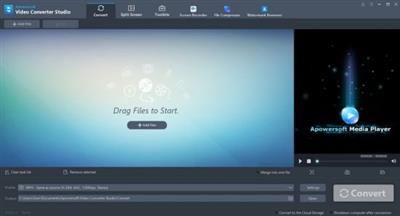
Apowersoft Video Converter Studio 4.8.8.0 Multilingual
File size: 64.1 MB
File size: 64.1 MB
Video Converter Studio is the most powerful movie video converter, and it was developed by Apowersoft. This video converter can convert all types of video formats, such as AVI, MP4, FLV, MKV and many others. It even converts audio formats, such as MP3, MP2, OGG, AAC and so on.
- Convert videos to any video or audio format
- Convert audio among all audio formats
- Edit your videos as you want
- Import external subtitle with its built-in subtitle editor
- Additionally, you can convert video and audio to many new formats, including HTML5, Android video, iPad, and iPhone 4S. In other words, this is the most powerful movie and video converter manager available.
High Quality Movie Video Converter
Video Converter Studio can preserve 100% video quality as the original video file, and support converting high quality movies, such as 720P and 1080P.
Add External Subtitles and Audio Files
You may want to add other audio files and subtitles to the original videos you want to convert. Video Converter Studio supports importing external audio files and subtitles.
Useful Subtitle Settings
It's easy for you to load external subtitles and edit freely with the built-in subtitle editor. This includes the font size of subtitles and positioning in the video. It also supports multiple language files.
Merge Pieces of Videos into One
You can combine several videos into one complete video file. It's useful for you to watch the whole video when you download several pieces of videos from online video sharing sites.
Various Output Formats
Video Converter Studio supports converting all video audio formats. It allows you to export video into a variety of output formats. You can also customize video parameters, such as frame size, width, height, and bitrate before converting.
Flexible Video Edit Options
You can cut original videos into small parts, as you want, and crop the blank edge of the video file by using the Crop function. Version 3.0 adds video effect editor, which allows you to set video contrast, brightness and saturation.
What's new
• official site does not provide any info about changes in this version
Homepage:
https://www.apowersoft.com/Download link
rapidgator.net:
uploadgig.com:
nitroflare.com:
1dl.net:
We need your support!
Make a donation to help us stay online

Bitcoin (BTC)
bc1q08g9d22cxkawsjlf8etuek2pc9n2a3hs4cdrld

Bitcoin Cash (BCH)
qqvwexzhvgauxq2apgc4j0ewvcak6hh6lsnzmvtkem

Ethereum (ETH)
0xb55513D2c91A6e3c497621644ec99e206CDaf239

Litecoin (LTC)
ltc1qt6g2trfv9tjs4qj68sqc4uf0ukvc9jpnsyt59u

USDT (ERC20)
0xb55513D2c91A6e3c497621644ec99e206CDaf239

USDT (TRC20)
TYdPNrz7v1P9riWBWZ317oBgJueheGjATm
Information |
|||
 |
Users of GUESTS are not allowed to comment this publication. | ||