


Batch MMedia Date Changer 2.09
Category: Apps (SEO/Marketing/Design)
- views: 92
- date: 20 April 2023
- posted by: mitsumi
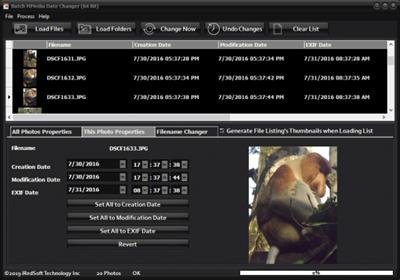
Batch MMedia Date Changer 2.09
File Size: 54.5 MB
File Size: 54.5 MB
Batch MMedia Date Changer (Formerly Known as Batch JPEG Date Changer) is a batch tool which saves you from those situations when you find your camera date time setting wrong (particularly during a battery change) or when it is set wrongly and finding all your photos with the wrong day or year. Conventional applications can change all the files to the same date and time but that's not good for photos which are taken at different times. Batch MMedia Date Changer is here to solve that and relief you from that headache. It not only works on the File Creation and Modification Date, it will change the EXIF Date and time which is embedded in the photos itself. You can determine if you want to change the date or time or both by setting a fixed date or time or using the Date Maths method by adding or subtracting time and date from the files. It can help you sync all the File Creation Date, Modification Date and EXIF Date too.
Batch MMedia Date Changer handles JPEG, Adobe RAW (DNG), Canon RAW (CR2), Fujifilm RAW (RAF), Nikon RAW (NEF), Olympus RAW (ORF), Panasonic RAW (RW2), Pentax RAW (PEF), PNG, TIFF, AVI, MTS, MPG, 3GP, 3G2, MP4 and MOV Formats.
There are applications out there which let you batch change all the file dates to a single date time which would not make much sense. Moreover, those only change the creation and modification date but the Digitized Date and Time in the EXIF header remains unchanged. The EXIF Date is important when uploading to the web especially one of the many cloud based photo storage services.
This application let you change the date and time different ways.
1) You can set all dates and times to be the same (if you want) or just change the date and leave the time as they are.
2) You can also use the Date Maths feature which lets you Add or Subtract Days, Months, Years, Hours, Minutes and/or Seconds from the current photo dates.
3) You can sync all the dates to either the Creation, Modification or EXIF Date.
4) Using the Incremental Date Change Settings, you can set the first date and time to use and all the subsequent files' dates and times will increment from there using a fixed interval which you can set via seconds or minutes.
5) You can also change each photo date and time individually.
https://www.batchimage.com/product-updates/batch-mmedia-date-changer-v1-72-released/Homepage:
https://www.batchimage.com/Download link
rapidgator.net:
nitroflare.com:
ddownload.com:
1dl.net:
We need your support!
Make a donation to help us stay online

Bitcoin (BTC)
bc1q08g9d22cxkawsjlf8etuek2pc9n2a3hs4cdrld

Bitcoin Cash (BCH)
qqvwexzhvgauxq2apgc4j0ewvcak6hh6lsnzmvtkem

Ethereum (ETH)
0xb55513D2c91A6e3c497621644ec99e206CDaf239

Litecoin (LTC)
ltc1qt6g2trfv9tjs4qj68sqc4uf0ukvc9jpnsyt59u

USDT (ERC20)
0xb55513D2c91A6e3c497621644ec99e206CDaf239

USDT (TRC20)
TYdPNrz7v1P9riWBWZ317oBgJueheGjATm
Information |
|||
 |
Users of GUESTS are not allowed to comment this publication. | ||