


VovSoft Prevent Disk Sleep 4.4
Category: Apps (SEO/Marketing/Design)
- views: 116
- date: 9 April 2023
- posted by: mitsumi
VovSoft Prevent Disk Sleep 4.4
File size: 2.0 MB
File size: 2.0 MB
Modern hard disks are set to automatically enter sleep mode (also known as idle time) whenever file operations are no longer happening. This is a method that helps with cooling the physical disk and prolonging its lifespan. However, if you wish to prevent this from happening, for example if you want the disk to quickly respond to file operations even after remaining idle for longs periods of time, then you can tinker with the built-in settings of your machine to turn off HDD sleep mode. If you find this method to be tedious, though, then you can turn to software utilities capable of keeping the HDD awake by creating small-sized files just to be able to mimic user interaction. Such a program is Prevent Disk Sleep.
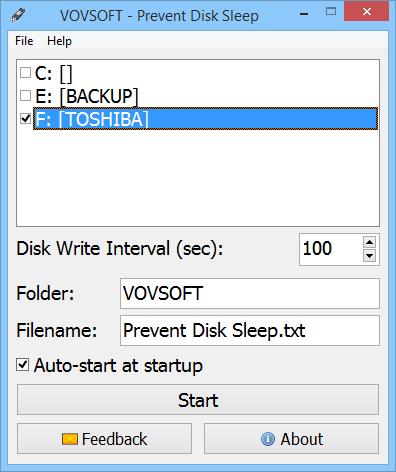
Designed with the casual user in mind, Prevent Disk Sleep is incredibly simple to use. It can be scheduled to create a plain text document (TXT) in any disk of your choice, whether it's local or external. After a speedy installation that requires minimal intervention, the tool opens a plain window which shows all options available. Once you identify the disks you wish to prevent from sleeping, it's necessary to pick the matching drive letters from a menu, set the disk write interval (in seconds, minimum is 10 seconds), edit the name of the TXT doc that will be created, as well as click the 'Start' button. The first step is creating the text document with the given name. It's placed inside VOVSOFT folder in the root of the selected disk, so it shouldn't be difficult to track down.
Prevent Disk Sleep doesn't create multiple files each time it writes to the disk. Instead, it updates the one document by adding date and time stamps. This is also helpful for logging its activity and finding out the exact time of each disk write. Whenever you want to disable Prevent Disk Sleep, simply stop the operation after returning to the main app window.
rapidgator.net:
uploadgig.com:
nitroflare.com:
1dl.net:
We need your support!
Make a donation to help us stay online

Bitcoin (BTC)
bc1q08g9d22cxkawsjlf8etuek2pc9n2a3hs4cdrld

Bitcoin Cash (BCH)
qqvwexzhvgauxq2apgc4j0ewvcak6hh6lsnzmvtkem

Ethereum (ETH)
0xb55513D2c91A6e3c497621644ec99e206CDaf239

Litecoin (LTC)
ltc1qt6g2trfv9tjs4qj68sqc4uf0ukvc9jpnsyt59u

USDT (ERC20)
0xb55513D2c91A6e3c497621644ec99e206CDaf239

USDT (TRC20)
TYdPNrz7v1P9riWBWZ317oBgJueheGjATm
Information |
|||
 |
Users of GUESTS are not allowed to comment this publication. | ||