


Qimage Ultimate 2023.112
Category: Apps (SEO/Marketing/Design)
- views: 83
- date: 27 March 2023
- posted by: oaxino
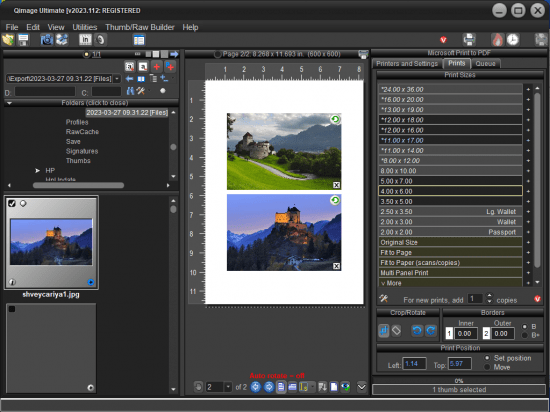
Qimage Ultimate 2023.112
File size: 22 MB
Qimage Ultimate is the most advanced photo printing software in the world. Continuing the Qimage legacy that has seen more than a decade of experience and innovation in photographic printing, it is the most frequently recommended photo printing software on the web. Used by everyone from casual shooters to professional photographers and studios, Qimage Ultimate is for people who recognize the importance of quality when it comes to photographic prints as they are the culmination of your efforts behind the lens.
Uncompromising in its quality and control, Qimage Ultimate combines incredible power and performance with a purpose built interface designed specifically for photo printing. Once you see how easy it is to fly through print jobs, sizing on the fly, refining and correcting photos (even raw photos and 3D photos) as you go, you'll wonder why the other tools make it so difficult.
Whether you print your own photos or you are prepping photos to be printed online or in-store, you need Qimage Ultimate to ensure that the end result of your efforts is the best it can be. Qimage Ultimate offers everything you need to go from the photos on your flash card all the way to print, including powerful raw photo tools, editing tools, job logging, custom layout creation, full ICC aware color management, ability to print larger than your driver will allow, even HDR, exclusive tone targeted selective sharpening, and much more so be sure to check the menu at the top of this page to explore.
Features of Ultimate Version
• Full color management for monitor, printer, and images
• Ability to print posters and print to image files for online printing
• Easily auto-arrange multiple prints with a variety of styles
• Vector, Pyramid interpolation for pro print quality/sharpness
• Latest "Hybrid" interpolation method: incredible quality/speed
• Individual color management settings on a print-by-print basis
• Automated job logging (jobs automatically saved for later recall)
• Batch conversion of multiple images
• Ability to quickly rate images with 1-5 rating
• Edit and search IPTC data
• Soft Proofing
• Raw image support for more than 300 cameras
• "Hybrid SE" interpolation method: smoother with no artifacts
• Organize photos using user defined photo albums
• Ability to tag prints with custom copyright/signature
• Ability to specify any size mirror borders/edges for canvas wraps
• Hyper printing: dual core/HT technology for faster printing
• Rulers and "snap" feature on full page editor
• Ability to define up to 100 print sizes (Lite/Pro limited to 10)
• New streamlined user interface
• New image databasing: add & search folder/photo descriptions
• Photo mats for unlimited (even or uneven) borders, text boxes, etc.
• Grouping via placement on templates/photo mats
• Thumbnail sorting by EXIF date shot
• New print-to-file UI walks you through prepping for online printing
• Exclusive Fusion interpolation offers incredible print detail
• Exclusive DFS halo-free sharpening for incredible detail
• More accurate color engine for all ICC profiles
• New raw engine with auto-fill, HDR, highlight recovery, and more
• On Deck area to defer printing/processing to a later date
• New Instaview: hold mouse button over thumb/print for preview
• Print quality meter: hold mouse over any print to evaluate
• Darkroom skin for incredible UI clarity
• Canvas shrinkage compensation corrects canvas length errors
• Lightning Raw: view, print, and edit raw photos instantly
• View, crop, and print 3D photos (MPO files) from 3D cameras
• Built in FlashPipe image downloader
• Tone targeted sharpening: selective sharpening
• High precision sizing/positioning in metric mode (0.1mm)
• EXIF data carried through to converted images
• Ability to tally paper/ink usage from job logs
• 100% netbook and tablet compatible
• Simple "codeless" registration and update process
• Fast track updates: the "latest and greatest" new features
http://www.ddisoftware.com/qimage-u/2018-changelog.txtHomepage:
http://www.ddisoftware.comDownload link
rapidgator.net:
https://rapidgator.net/file/a69efdf023652be26a1380d785529f88/repmn.Qimage.Ultimate.2023.112.rar.html
uploadgig.com:
nitroflare.com:
1dl.net:
We need your support!
Make a donation to help us stay online

Bitcoin (BTC)
bc1q08g9d22cxkawsjlf8etuek2pc9n2a3hs4cdrld

Bitcoin Cash (BCH)
qqvwexzhvgauxq2apgc4j0ewvcak6hh6lsnzmvtkem

Ethereum (ETH)
0xb55513D2c91A6e3c497621644ec99e206CDaf239

Litecoin (LTC)
ltc1qt6g2trfv9tjs4qj68sqc4uf0ukvc9jpnsyt59u

USDT (ERC20)
0xb55513D2c91A6e3c497621644ec99e206CDaf239

USDT (TRC20)
TYdPNrz7v1P9riWBWZ317oBgJueheGjATm
Information |
|||
 |
Users of GUESTS are not allowed to comment this publication. | ||