


TCP Monitor Plus 2.93
Category: Apps (SEO/Marketing/Design)
- views: 189
- date: 17 March 2023
- posted by: oaxino
TCP Monitor Plus 2.93
File Size : 0.4 Mb
File Size : 0.4 Mb
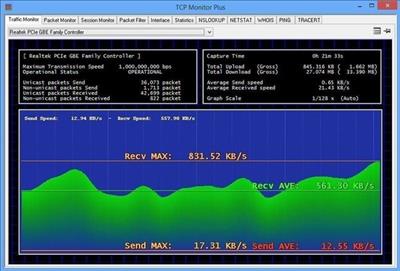
TCP Monitor Plus can monitor network connections for each connected adapter, providing information regarding data traffic, bandwidth, packets and their routes, or occurring events. Thanks to its simple approach and rich toolset, it comes in handy to all network administrators who want to have it all in a single package.
Monitor the network traffic in real time
For a selected network adapter, TCP Monitor Plus can retrieve real-time information regarding data traffic, as well as sent and received packets, displaying a graphical representation of the transfer speed, with minimum and maximum values marked down.
Not only that it retrieves network statistics, but it displays all the transferred packets along with hostnames of the data exchanging computers, IP addresses, used ports, protocols, and date stamps.
Moreover, it bundles a session monitoring tool that shows the number of active connections, as well as packet filtering capabilities to help you block certain connections. Additionally, it generates a statistical report containing the number of incoming datagrams, detected errors, and so on.
NSLOOKUP, NETSTAT, WHOIS, PING and TRACEROUTE
Aiming to provide a complete network monitoring toolset, TCP Monitor Plus also comes with NSLOOKUP, NETSTAT, WHOIS, PING and TRACEROUTE tools that are otherwise available via the command console. The advantage is that you just have to navigate to the designated tab to open an utility, so usage is much easier.
When minimized, TCP Monitor Plus stays hidden in the system tray, without interfering with your work. There is a so-called 'Mini-Monitor' you can enable, so as to get information at a glance about network traffic from a small floating window on your desktop, similar to a gadget. And if you don't want such a small window on your desktop permanently, you can configure TCP Monitor Plus to periodically show a popup ballon with network traffic information.
All-in-one network monitoring and testing toolkit
Although not difficult to use, TCP Monitor Plus mainly targets experienced users who know how to manage the provided information. With a good overall operational speed, real-time network monitoring capabilities and built-in testing tools, it belongs in the toolset of any network administrator out there.
Whats New
Updates: official site does not provide any info about changes in this version
Homepage:
https://dns-plus.net/Download link
rapidgator.net:
uploadgig.com:
nitroflare.com:
ddownload.com:
We need your support!
Make a donation to help us stay online

Bitcoin (BTC)
bc1q08g9d22cxkawsjlf8etuek2pc9n2a3hs4cdrld

Bitcoin Cash (BCH)
qqvwexzhvgauxq2apgc4j0ewvcak6hh6lsnzmvtkem

Ethereum (ETH)
0xb55513D2c91A6e3c497621644ec99e206CDaf239

Litecoin (LTC)
ltc1qt6g2trfv9tjs4qj68sqc4uf0ukvc9jpnsyt59u

USDT (ERC20)
0xb55513D2c91A6e3c497621644ec99e206CDaf239

USDT (TRC20)
TYdPNrz7v1P9riWBWZ317oBgJueheGjATm
Information |
|||
 |
Users of GUESTS are not allowed to comment this publication. | ||