


Visual Subst 5.0 Bilingual
Category: Apps (SEO/Marketing/Design)
- views: 90
- date: 17 March 2023
- posted by: mitsumi
Visual Subst 5.0 Bilingual
Fiel size: 12.33 MB
Fiel size: 12.33 MB
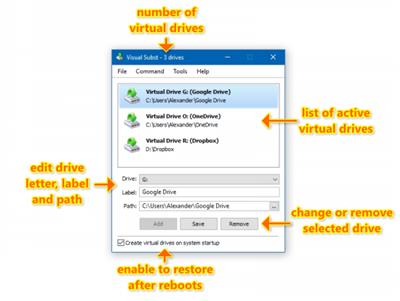
Visual Subst is a handy utility which allows you to associate the most accessed directories with virtual drives. It solves 3 main issues with the built-in 'subst' command: it seamlessly creates drives for elevated applications, adds editable drive labels and restores virtual drives after reboots. Also, Visual Subst makes it easier to create, edit and remove virtual drives in a GUI way.
You can use virtual drives everywhere – it's so much easier to access files in a project directory you are currently working on using just a single drive letter. Visual Subst provides you with a clean, simple and distraction-free user interface where you can manage all your virtual drives at any time.
How It Works
Generally, a virtual drive is a symbolic link in the local MS-DOS device namespace. It is just one more Windows feature added for backward compatibility with old programs and batch scripts.
Unfortunately, there are some significant limitations with the built-in 'subst' command under Windows Vista and above. Virtual drives created with 'subst' command aren't visible for elevated applications (if you run a file manager or Command Prompt as administrator, you will realize that apps see these drives differently). You cannot define drive labels – label of the source drive is always used and it cannot be changed. All virtual drives are removed when the user logs off or restarts the computer.
Visual Subst makes virtual drives usable again under newest versions of Windows
• UAC and elevated applications: Visual Subst seamlessly creates virtual drives for elevated applications duplicating the drives created for the standard user. It bypasses UAC prompts using the same technique as Hidden Start with /NOUAC switch making no distraction to the user.
• Virtual drive labels: Drive labels are useful if you often use Windows Explorer. Visual Subst allows you to define and edit virtual drive labels easily.
• Restoring drives after restart: Visual Subst saves the list of virtual drives and loads it on the system startup. No additional action required – just make sure that "Create virtual drives on system startup" option is enabled.
Compatible OS: Windows 11, 10, 8, 7 and Vista (32-bit and 64-bit)
rapidgator.net:
uploadgig.com:
nitroflare.com:
ddownload.com:
We need your support!
Make a donation to help us stay online

Bitcoin (BTC)
bc1q08g9d22cxkawsjlf8etuek2pc9n2a3hs4cdrld

Bitcoin Cash (BCH)
qqvwexzhvgauxq2apgc4j0ewvcak6hh6lsnzmvtkem

Ethereum (ETH)
0xb55513D2c91A6e3c497621644ec99e206CDaf239

Litecoin (LTC)
ltc1qt6g2trfv9tjs4qj68sqc4uf0ukvc9jpnsyt59u

USDT (ERC20)
0xb55513D2c91A6e3c497621644ec99e206CDaf239

USDT (TRC20)
TYdPNrz7v1P9riWBWZ317oBgJueheGjATm
Information |
|||
 |
Users of GUESTS are not allowed to comment this publication. | ||