


Windows Firewall Notifier 2.6 beta
Category: Apps (SEO/Marketing/Design)
- views: 330
- date: 14 March 2023
- posted by: oaxino
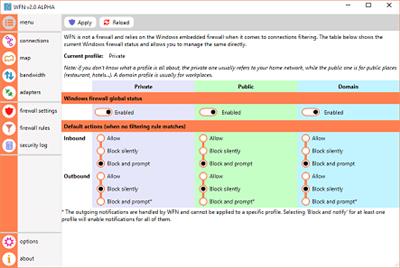
Windows Firewall Notifier 2.6 beta
File Size : 49.4 Mb
File Size : 49.4 Mb
Windows Firewall Notifier (shortly known as WFN) will track all the active processes and services and notifies you each time an application wants to connect to your computer. On this manner, you can easily safeguard your PC, as well as your personal documents against viruses, malware, spam and other threats lurking the Internet.
Being designed mostly to extend the functionality of the default Windows embedded Firewall, the application is aimed at fully-customize the way of managing the rules and tracking all the processes that are connected to your computer. As you might know, each time a process or service is detected, the Firewall prompts you with a small notification window from where you can allow or block the access to your files.
By default, the Windows operating system does not block any of the outgoing connections, meaning that your entire computer is exposed to threats and that any program you have installed on your PC (especially those apps downloaded from untrusted websites) can send information to unauthorized sources without your consent.
When you launch the program for the first time, you can enable the notifications, as well as create a blocking rule in order to strengthen some security settings. Additionally, Windows Firewall Notifier blocks all the apps even if you disable WFN notifications.
The main window displays all of the available processes and active connections along with some basic information such as 'Protocol', 'Local address', 'Local port' and 'Creation Time'. Also, the closed connections (marked with the orange color) will be displayed in the main window for a few seconds before disappearing.
By accessing the Rules section, you can preview all the available Windows Firewall rules, as well as manually create new ones or remove them if required.
To conclude, Windows Firewall Notifier comes in handy for users who need to monitor all the outgoing connections and available services, as well as view real-time information regarding the Firewall rules.
https://github.com/wokhansoft/WFN/releasesHomepage:
https://www.wokhan.com/Download link
rapidgator.net:
uploadgig.com:
nitroflare.com:
ddownload.com:
We need your support!
Make a donation to help us stay online

Bitcoin (BTC)
bc1q08g9d22cxkawsjlf8etuek2pc9n2a3hs4cdrld

Bitcoin Cash (BCH)
qqvwexzhvgauxq2apgc4j0ewvcak6hh6lsnzmvtkem

Ethereum (ETH)
0xb55513D2c91A6e3c497621644ec99e206CDaf239

Litecoin (LTC)
ltc1qt6g2trfv9tjs4qj68sqc4uf0ukvc9jpnsyt59u

USDT (ERC20)
0xb55513D2c91A6e3c497621644ec99e206CDaf239

USDT (TRC20)
TYdPNrz7v1P9riWBWZ317oBgJueheGjATm
Information |
|||
 |
Users of GUESTS are not allowed to comment this publication. | ||