


WinNTSetup 5.3
Category: Apps (SEO/Marketing/Design)
- views: 105
- date: 3 March 2023
- posted by: oaxino
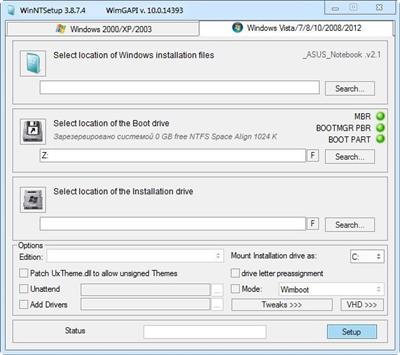
WinNTSetup 5.3
File Size : 1.5 Mb
File Size : 1.5 Mb
WinNTSetup is a universal Windows Setup Tool .This is a lightweight utility whose main purpose is to install Operating Systems using a formatted USB drive or Flash media seamlessly.
Features
Install Windows 2k/XP/2003/2008/2012/Vista/7/8.x/10 x86/x64
practically runs even on the most minimalistic WinPE
choose able drive letter for the new windows installation
Install windows also if nlite/vlite has remove winnt32.exe/setup.exe
Integrate drivers: normal PNP and textmode drivers, too!
patch uxtheme to allow unsigned themes
use some often used tweaks for the new installation
supporting "Windows to Go" for Windows 7 and later installs
Supports WimBoot option for Windows 8.1 Update 1
Whats New
- compiler updated to PureBasic 6.00 C-Backend
- updated wimlib to version 1.13.6
- right-click on apply mode combo opens Tools\Compact\WimBootCompress.ini
- fixed errors with native 4K drives
- fixed VSS error not displayed
- fixed Bootice Mod always starts in darkmode
- fixed capture problem with OneDrive On-Demand files
- fixed error message on FormatEx failures
- fixed inaccessible devices were listed in drive combo boxes
- fixed offline windows scan may not detect Windows 10/11 builds correctly
- fixed internal VHD boot files option may create duplicate BCD entries
- fixed auto format may not work if drive is in use
- fixed loading ISO with relative path may create duplicates in source combo box
- added commandline switch for VHD-CREATE -uuid:{UUID} (simular to VBoxManage internalcommands sethduuid)
- added WinCopy option (copy Windows from one partition to another)
- added WinCopy and WinCopy-CLI command line
- added ReFS support for Windows 11 23H2
- added combobox script selection to diskpart window
- added -diskpart command line switch to bring up diskpart window
- added WIM_MSG_ERROR and WIMLIB_PROGRESS_MSG_HANDLE_ERROR Messagebox choice
- added Remove OneDrive tweak
- added DISM feature enable/disable and APPX removal
- added possability to disable SFX detection with file: "nosfx" next to WinNTSetup_x64.exe
- new right-click on tweaks button to quickly disable all tweaks
- changed wimlib is the default compression engine
- changed Unattend: Win7-11-Select.xml disables 42 days password expire
- changed rearrage folder layout
- MinWin: support inline comments (//)
- MinWin: grant full admin access to files
- MinWin: fixed VCRuntime 2008 installer needs sxsstore.dll and config\TxR
- MinWin: fixed diskpart shrink needs defragproxy.dll
- RegImport: added support for[?HKEY_LOCAL_MACHINE\...] (only processed if key exists)
- workaround windows 7 Dism /add-driver bug 30 (AMD, NVIDIA drivers with LZSS compression)
- workaround EFI NTFS driver bug
Homepage:
https://msfn.org/board/topic/149612-winntsetup-v389/?page_id=13Download link
rapidgator.net:
uploadgig.com:
nitroflare.com:
1dl.net:
We need your support!
Make a donation to help us stay online

Bitcoin (BTC)
bc1q08g9d22cxkawsjlf8etuek2pc9n2a3hs4cdrld

Bitcoin Cash (BCH)
qqvwexzhvgauxq2apgc4j0ewvcak6hh6lsnzmvtkem

Ethereum (ETH)
0xb55513D2c91A6e3c497621644ec99e206CDaf239

Litecoin (LTC)
ltc1qt6g2trfv9tjs4qj68sqc4uf0ukvc9jpnsyt59u

USDT (ERC20)
0xb55513D2c91A6e3c497621644ec99e206CDaf239

USDT (TRC20)
TYdPNrz7v1P9riWBWZ317oBgJueheGjATm
Information |
|||
 |
Users of GUESTS are not allowed to comment this publication. | ||