


Batch AI Photo Sharpener 1.0
Category: Apps (SEO/Marketing/Design)
- views: 104
- date: 2 November 2022
- posted by: mitsumi
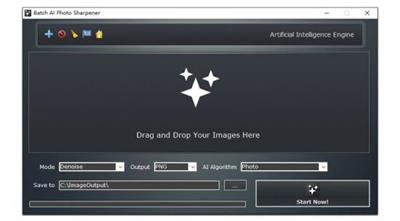
Batch AI Photo Sharpener 1.0
File Size : 71.1 Mb
File Size : 71.1 Mb
A new Windows desktop software program sharpens and enhances photos in bulk offline by the AI and Deep Learning algorithms, denoises and unblurs low quality images to high quality easily.
One enhancement, multiple images
Batch editors are in a bit of a difficult spot to ascertain right now. Wanting to adjust the same parameter across multiple images at the same time can be a bit trial-and-error sometimes, as you'll inevitably have to go back and modify some stuff accordingly, as each image has its own particularities.
Sharpening multiple photos at once, or unblurring or denoising them, sounds good on paper, but in practice, the predicted and actual results can vary.
It's simple enough to get started with this one, at least: drop in the photos you wish to work with, and select the type of enhancement you want to apply. As mentioned before, you can sharpen, unblur, and denoise your images, and if you're working with cartoons or anime, there's a special AI algorithm mode for that.
The results
Upon feeding a few batches of photos, and choosing the enhancements we wanted to apply, the tool was rather quick with its work. The results were very hit-or-miss, however, as some photos either came out oversharpened, or suffered a noticeable loss of finer details.
In addition, some images outright seem to not jive well with this at all, as they would get exported at a very low, 320x256 resolution. We haven't found what may be causing this, but you'll end up with some photos coming out less clear and less detailed than they were before.
Could be better
Batch AI Photo Sharpener is intuitive enough to utilize, but that's about it. The photos it exports look overly processed, with some even coming out much less detailed as a result. The inclusion of a slider, or some manner to adjust the enhancement strength, would have been of great benefit here.
Whats New
Updates: official site does not provide any info about changes in this version
Homepage:
https://bggenerator.com/batch_ai_photo_sharpener.htmlDownload link
rapidgator.net:
uploadgig.com:
nitroflare.com:
1dl.net:
We need your support!
Make a donation to help us stay online

Bitcoin (BTC)
bc1q08g9d22cxkawsjlf8etuek2pc9n2a3hs4cdrld

Bitcoin Cash (BCH)
qqvwexzhvgauxq2apgc4j0ewvcak6hh6lsnzmvtkem

Ethereum (ETH)
0xb55513D2c91A6e3c497621644ec99e206CDaf239

Litecoin (LTC)
ltc1qt6g2trfv9tjs4qj68sqc4uf0ukvc9jpnsyt59u

USDT (ERC20)
0xb55513D2c91A6e3c497621644ec99e206CDaf239

USDT (TRC20)
TYdPNrz7v1P9riWBWZ317oBgJueheGjATm
Information |
|||
 |
Users of GUESTS are not allowed to comment this publication. | ||