


HitPaw Screen Recorder 2.3.2.1 Multilingual
Category: Apps (SEO/Marketing/Design)
- views: 297
- date: 20 October 2022
- posted by: mitsumi
HitPaw Screen Recorder 2.3.2.1 Multilingual
Windows x64 | File size: 209.37 MB
Windows x64 | File size: 209.37 MB
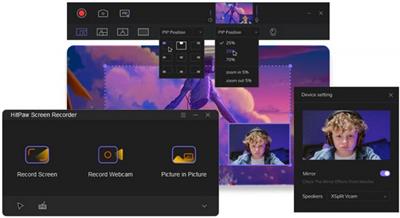
HitPaw Screen Recorder - the best screen recorder to help capture screen, record webcam and picture in picture without any hassle.Three simple modes to help every user record screen, webcam and picture in picture videos in simple steps.
Several Smart Screen Recording Features
Picture in Picture Recording
4 options to choose, make record charming
• Big screen and small camera for presentation
• Big camera recording and small screen for meetings
• Quick switch to webcam recording
• One-click to enter screen recording mode
Record Screen/Webcam
Record with or without audio as you like
• Record full/selected screen with zoom feature
• Record webcam and easily change resolution
• Record screen with audio for special use
• Capture screenshot while recording anything
What Makes HitPaw Screen Recorder Great
• Zoom Recording
• Customize Resolution
• One-click Mirror Screen
• Support Hardware Acceleration
• Several Record Effects
• Segment Recording
• Quick Edit
• Customize PIP Position/Size
• Real-Time Monitoring
How to Use HitPaw Screen Recorder
Record Full Screen
Step 1:From the home interface, select Record Screen mode to get started.
Step 2:Click to select full screen or long-press to choose a specific area to start recording.
Step 3:End the recording whenever you want and trim it quickly.
Webcam Recording
Step 1:Select the webcam you need to record and then click Record Webcam mode.
Step 2:Click Recording button to start, you can also change the webcam setting at the same time.
Step 3:Click Stop button to end the recording.
Picture in Picture Recording
Step 1:Select Picture in Picture mode and then the recording area.
Step 2:Click on Record button to start recording, adjust the PIP setting if there are requirements.
Step 3:Click Stop button to finish the recording, the software will take you to the editing interface automatically.
What's new
• official site does not provide any info about changes in this version
Homepage:
https://www.hitpaw.com/screen-recorder.htmlDownload link
rapidgator.net:
uploadgig.com:
nitroflare.com:
1dl.net:
We need your support!
Make a donation to help us stay online

Bitcoin (BTC)
bc1q08g9d22cxkawsjlf8etuek2pc9n2a3hs4cdrld

Bitcoin Cash (BCH)
qqvwexzhvgauxq2apgc4j0ewvcak6hh6lsnzmvtkem

Ethereum (ETH)
0xb55513D2c91A6e3c497621644ec99e206CDaf239

Litecoin (LTC)
ltc1qt6g2trfv9tjs4qj68sqc4uf0ukvc9jpnsyt59u

USDT (ERC20)
0xb55513D2c91A6e3c497621644ec99e206CDaf239

USDT (TRC20)
TYdPNrz7v1P9riWBWZ317oBgJueheGjATm
Information |
|||
 |
Users of GUESTS are not allowed to comment this publication. | ||