Digital Portrait Drawing: Realistic Faces, Beginner To Pro
Date: 3 June 2025 | Posted by: 0nelove
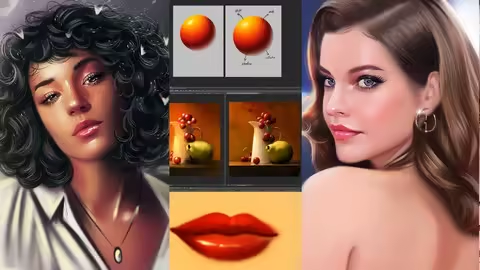
Digital Portrait Drawing: Realistic Faces, Beginner To Pro
Published 6/2025
MP4 | Video: h264, 1280x720 | Audio: AAC, 44.1 KHz
Language: English | Size: 3.26 GB | Duration: 2h 51m
Learn to draw realistic digital portraits step-by-step – from basic sketching to finished art
What you'll learn
How to draw realistic digital portraits from scratch
Mastering facial proportions, features, and symmetry
Shading techniques to create depth and realism
Coloring skin tones, hair, eyes, and lips digitally
Step-by-step workflow from sketch to final artwork
Using layers, brushes, and blending tools effectively
Creating lifelike portraits in Procreate (or Photoshop)
Tips for developing your own unique portrait style
Exporting and presenting your work professionally
Building confidence to create portrait commissions or personal art
Requirements
No prior drawing experience is required – this course is beginner-friendly
A digital drawing tablet or iPad with stylus (Apple Pencil recommended)
Procreate, Photoshop, or any digital art software you're comfortable with
Basic understanding of how to use your chosen software
Motivation to learn and practice digital portrait drawing
Optional: A stable internet connection to stream HD video lessons
Description
Are you ready to master the art of drawing realistic digital portraits, even if you've never picked up a stylus before?In this step-by-step course, you'll learn how to create stunning, lifelike portraits using digital tools like Procreate, Photoshop, or your favorite drawing software. Whether you're a total beginner or an artist looking to sharpen your portrait skills, this course will guide you through the entire process from a blank canvas to a fully rendered digital face.You'll start by understanding the basic structure of the head, facial proportions, and how to sketch convincing features. Then, you'll dive into shading, lighting, skin tones, and fine details like hair, eyes, and lips. The course includes practical demonstrations, downloadable resources, and insider tips to help you develop your own unique portrait style. What you'll get:Easy-to-follow lessons, perfect for beginnersTechniques for sketching, shading, and coloring realistic facesFocus on female portrait features, skin tones, and beauty detailsPro tips for using layers, brushes, and blending tools effectivelyA complete workflow from concept to finished artworkThe confidence to create your own portraits or start freelance workThis course is created by Yaşar Vurdem, a professional digital artist who has collaborated with top brands such as Adobe, Billie Eilish, Logitech, Ubisoft, Wacom, XP-Pen, . His clear teaching style and industry experience make this course both practical and inspiring.Whether you want to draw for fun, grow your digital art portfolio, or start offering commissions – this course is your roadmap to becoming a confident digital portrait artist. Enroll now and start turning your artistic ideas into powerful digital portraits today!
Overview
Section 1: Welcome
Lecture 1 Welcome
Section 2: Portrait Painting in Photoshop I
Lecture 2 Portrait Painting in Photoshop I
Lecture 3 Portrait Painting in Photoshop I / II
Section 3: Portrait Painting in Photoshop II
Lecture 4 Portrait Painting in Photoshop II
Section 4: Portrait Painting in Photoshop III
Lecture 5 Portrait Painting in Photoshop III
Section 5: Rendering Tips
Lecture 6 Rendering Tips
Section 6: How to Paint Hair in Photoshop
Lecture 7 How to Paint Hair in Photoshop
Lecture 8 How to Paint Hair in Photoshop II
Lecture 0 Portrait Painting in Photoshop
Beginners who want to learn how to draw realistic digital portraits,Traditional artists transitioning to digital tools,Digital art enthusiasts looking to improve their portrait skills,Illustrators and hobbyists who want to master facial features and skin tones,Anyone interested in creating professional-looking female portraits,Artists aiming to build a portfolio or start freelance portrait work,Students who enjoy step-by-step learning and visual examples
Screenshot
https://www.udemy.com/course/digital-portrait-drawing-realistic-faces-beginner-to-pro/
Buy Premium From My Links To Get Resumable Support and Max Speed
https://rapidgator.net/file/e1d73f1309de27cac6c6f7dced5e163a/Digital_Portrait_Drawing_Realistic_Faces_Beginner_to_Pro.part4.rar.html
https://rapidgator.net/file/f479299fdc8c9a385b71c8d7bd87e03f/Digital_Portrait_Drawing_Realistic_Faces_Beginner_to_Pro.part3.rar.html
https://rapidgator.net/file/66399947602877083a97ad315a49bbc1/Digital_Portrait_Drawing_Realistic_Faces_Beginner_to_Pro.part2.rar.html
https://rapidgator.net/file/b62d4fbe9d0a2c3164d6dd919670ccaf/Digital_Portrait_Drawing_Realistic_Faces_Beginner_to_Pro.part1.rar.html
https://nitroflare.com/view/276918494B31B6C/Digital_Portrait_Drawing_Realistic_Faces_Beginner_to_Pro.part4.rar
https://nitroflare.com/view/9C1D33102A20D03/Digital_Portrait_Drawing_Realistic_Faces_Beginner_to_Pro.part3.rar
https://nitroflare.com/view/0C16F3E118771CF/Digital_Portrait_Drawing_Realistic_Faces_Beginner_to_Pro.part2.rar
https://nitroflare.com/view/EA0D7D38C7C2F53/Digital_Portrait_Drawing_Realistic_Faces_Beginner_to_Pro.part1.rar
See full article