Learn To Create Prototypes In Figma For Loading E.G Spinner
Date: 20 September 2023 | Posted by: oaxino
Learn To Create Prototypes In Figma For Loading E.G Spinner
Published 9/2023
MP4 | Video: h264, 1280x720 | Audio: AAC, 44.1 KHz
Language: English | Size: 329.16 MB | Duration: 0h 57m
Figma for beginners
Published 9/2023
MP4 | Video: h264, 1280x720 | Audio: AAC, 44.1 KHz
Language: English | Size: 329.16 MB | Duration: 0h 57m
Figma for beginners
What you'll learn
Learn the Figma basics of use of lines, circles and text
Create a loading bar
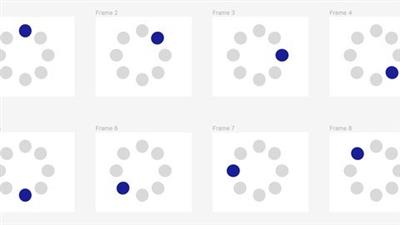
Create a loading spinner
Create horizontal navigation bar
Requirements
No experience required, basic Figma information should suffice. Basic Computer knowledge
No programming experience needed.
Ready to learn step by step rather than cumultive
Description
This course is created for all those varied aged learners who would like to explore the world of design. In this course we will focus specifically on one particular software called Figma. Now, Figma is one of the tool that helps designers create low fidelity prototypes, wireframes, high fidelity prototypes and others. It is a playful software and is available online at no cost. Figma can be used to draw various shapes, from triangles, rectangles, squares which are usually inside frames. Figma also has a Text box.About Figma: There is also a hand tool, resources icon, add comment, a pen and a pencil, rectangle, line, arrow, ellipse, polygon, star and you can even place an image or a video. There is option for frame, slice and section. You can move or scale it. Then also there are bunch more options from the Figma icon like File, Edit, View, Object, Text, Arrange, Vector, Plugin, Widgets, Preferences, Library and finally help and account. The course consist of power point and videos. The power point first gives you detailed information about what the steps are to achieve something, this is followed by a tutorial video which shows the steps in relatively slow speed. it is used to create loading features like we see on the internet today from a bar that fills up with color, a spinner where a dot rotates in a circle and a navigation bar which is an essence of website. It uses components, breaking the components to create variants, copying using command D, using options to create copy with varies lengths, to create active state and non-active states of a button.I created this course so that people learn as much as possible without the stress or any pressure in their life. We all have a million things going on and one of the best thing we can do as an instructor on udemy is to make your learning easier.
Overview
Section 1: Loading Bar with colours
Lecture 1 Design loading bar
Section 2: Loading ellipse with wave
Lecture 2 Ellipse Loading Wave
Section 3: Loading bounce ball
Lecture 3 Bounce Ball Loading in Figma
Section 4: Navigation Bar with drop-down menu
Lecture 4 Navigation Bar
Section 5: Spinning circle loading
Lecture 5 Loading spinning circles
Beginner Figma users, first time design students using figma, UX Designers
rapidgator.net:
uploadgig.com:
nitroflare.com:
See full article