Mastering Packaging Design From Scratch
Date: 4 April 2023 | Posted by: voska89
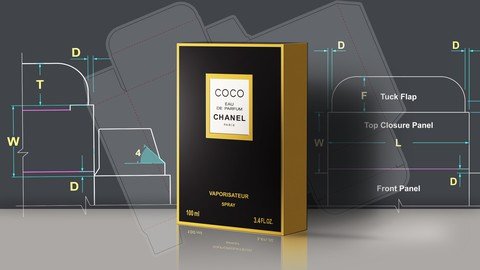
Free Download Mastering Packaging Design From Scratch
Published 4/2023
MP4 | Video: h264, 1280x720 | Audio: AAC, 44.1 KHz
Language: English | Size: 2.60 GB | Duration: 4h 19m
Learn to Design Packaging Using Illustrator, coreldraw & Photoshop
Free Download What you'll learn
Using Illustrator & Corel draw to draw dieline
Planning & Types of Packaging
Mathematics of dieline structure design
Create Package Mock-Ups in Adobe Photoshop
Create Package Mock-Ups in Adobe Illustrator
Create Package Mock-Ups in Coreldraw
Print and Create Real Package Mock-Up
Read a dieline (cut, folds, flaps, etc.)
Requirements
Some knowledge in graphic design
Description
Package Design is all around us and every company in one way or another will encounter Packaging design needs, That required special shape, material, color, and information that play important role in expressing the brand experience.In this course we will start from what you should know before start packag design, such as- knowing the product, consumer, and how are people buying the product.- what information need to be collected- How to choose the right type of packaging.- how to evaluate and collect feed back.Then we will talk about cardboard thickness and how to choose between them.Then you will Learn about the basics of designing packages for everything from foodstuffs to fragrance, and make the products visually appealing.I will reviews the types of packaging , and then concentrates on folding cartons.After that you will learn about dieline ( how to read and examine, Relations and mathematics, Parts and mechanics of the package )Thin you will learn how to create dielines ( the flattened view of your package ) and add artwork and text using Adobe Illustrator and CorelDraw.Then you will learn how to create mockup for your package using Adobe Photoshop, Illustrator And CorelDraw.Then find out how to print and cut out a Real mockup version of your package.
Overview
Section 1: Introduction
Lecture 1 Introduction
Section 2: The ultimate guide to product packaging
Lecture 2 3 Questions to answer
Lecture 3 Information to collect
Lecture 4 Understanding packaging layers
Lecture 5 Choosing the right type of packaging
Lecture 6 Creating information architecture
Lecture 7 Evaluating a packaging design
Lecture 8 Collecting feedback
Section 3: Types of Packaging
Lecture 9 Types of packeging
Lecture 10 basic types of boxes
Section 4: Planning a Package
Lecture 11 Making the decision of packaging type
Lecture 12 Considering the consumer experience
Lecture 13 Accommodating instructional-legal copy, barcode, etc
Lecture 14 Cardboard thickness
Section 5: Dieline The Road Map
Lecture 15 Reading a dieline (cut, folds, flaps, etc.)
Lecture 16 Examining a package die
Lecture 17 Mathematics of dieline structure design
Lecture 18 Replicating a package
Section 6: Using Illustrator to draw dieline
Lecture 19 Basic panels
Lecture 20 Adding flaps and fold-in tabs
Lecture 21 Finishing
Section 7: Designing in Illustrator
Lecture 22 Preparing the golden background
Lecture 23 Preparing logo, text & barcode
Lecture 24 Putting all together
Section 8: Using CorelDraw 2021 to draw dieline
Lecture 25 Basic panels
Lecture 26 Adding flaps and fold-in tabs
Lecture 27 Finishing
Section 9: Designing in CorelDraw 2021
Lecture 28 Preparing the golden background Photoshop
Lecture 29 Preparing logo, text & barcode
Lecture 30 Putting all together
Section 10: Mockups Design
Lecture 31 Design Using Photosop Part 1
Lecture 32 Design Using Photosop Part 2
Lecture 33 Design Using Illustrator
Lecture 34 Design Using CorelDraw Part 1
Lecture 35 Design Using CorelDraw Part 2
Section 11: Printing and cutting real mockup
Lecture 36 Printing
Lecture 37 Cutting Full Size mockup
Designers want to learn about package design,Individuals want to make a unique packages for their products
Homepage
https://www.udemy.com/course/mastering-packaging-design-from-scratch/DOWNLOAD LINK
Links are Interchangeable - Single Extraction
See full article