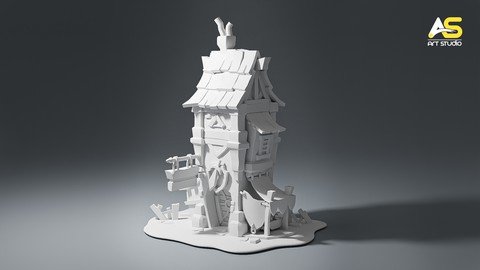
Modeling A Game Asset Castle In Blender
Date: 16 February 2023 | Posted by: voska89
Published 2/2023
MP4 | Video: h264, 1280x720 | Audio: AAC, 44.1 KHz
Language: English | Size: 5.41 GB | Duration: 5h 13m
This is an extensive Modeling guide to create any stylized house, castle and low-poly game assets
What you'll learn
Use Blender and understand it's interface
Project files is included
Modeling and create different low-poly assets
A lot of cool shortcuts and techniques of modeling
Stylized game assets
Requirements
Mac or PC capable of Running Blender Version 3.1 or above
You will learn all of the tools that will be needed for this course.
Description
This is an extensive video guide for those who want to learn ins and outs of Modeling in blender to create any stylized house or castle and as well low-poly assets for games.From a time, game never have been stopped. People and companies are producing new video games every day and there is a lot of clients that searching after good artists to hire them with good salary and benefits. So, while modeling is a good opportunity to make money and make contact with other side of the world, why not start learn it today?With free blender you can create any cool game assets, special low-poly modeling which is another our goal in this course.I believe in this course is a list of techniques that must be known and if you use more or some of the boxes in this list, it will immediately improve the result of creating Stylized low-poly assets. And fortunately, everyone can learn this quickly.Welcome to Modeling a stylized castle in blender a premium course that offers a step-by-step guide to modeling assets and props that can be used in games.all the models and blender scenes that are needed for following along the videos or just checking the final result, come along with the course and will be available for downloading.As for the difficulty answering the question is this course for me? I tried to teach everything step by step, special in the first chapter.I already created the second part of this course which in that course I am going to teach you the texturing and cinematic lighting in Blender to make every scene look professional and as well cinematic! So, take a look at that!If you get stuck, I am here to help you to get unstuck. If you have any questions, feel free to reach out to me by email. And really any questions or any constructive criticism to help me to improv my instructions, which is going to help you to understand my intensions while I'm teaching you, is always appreciated! At the end I am open to work. Thank you so much and welcome
Overview
Section 1: Introduction
Lecture 1 01-01 - The Blender 3.4 interface
Lecture 2 01-02 - Viewport overview & overlays
Lecture 3 01-03 - Edit Mode
Lecture 4 01-04 - Pie menu & 3D Cursor
Section 2: Blocking Stage
Lecture 5 02-05 - Intro to image reference
Lecture 6 02-06 - Modeling Blocking stage Modeling the basic shape
Lecture 7 02-07 - Blocking p 2
Lecture 8 02-08 - Modeling the basic shape of house
Section 3: Modeling Stones Assets
Lecture 9 03-09 Modeling the stones
Lecture 10 03-10 Separating object
Lecture 11 03-11 Modeling the holder stone
Lecture 12 03-12 Modeling the stones
Lecture 13 03-13 Modeling the stone without subdivision
Lecture 14 03-14 Replacing the stones
Section 4: Modeling wooden assets
Lecture 15 04-15 Modeling the wooden door
Lecture 16 04-16 Modeling the wooden window
Lecture 17 04-17 Modeling the Shield & Sword
Lecture 18 04-18 Adding pillar and apply scale
Lecture 19 04-19 Modeling the canopy & window
Lecture 20 04-20-01 Modeling roof pillars
Lecture 21 04-20-02 Modeling the roof tiles
Lecture 22 04-20-03 Working extra on chimney
Lecture 23 04-21 Modeling the Warehouse
Section 5: Modeling Metal Assets
Lecture 24 05-22 Modeling the metal Door
Lecture 25 05-23 Modeling the chalkboard P1
Lecture 26 05-24 Modeling the Chimney P2
Lecture 27 05-25 manipulating the chalkboard and Chimney
Lecture 28 05-26 Fish Eye in Viewport
Section 6: Modeling Filling Assets
Lecture 29 06-27 Modeling the curtain
Lecture 30 06-28 Modeling curtain finish
Lecture 31 06-29 Modeling the wood planks
Lecture 32 06-30-01 Modeling the bench
Lecture 33 06-31 Modeling the cup and saucer
Lecture 34 06-32 Modeling book & straw
Lecture 35 06-33 Order of modifiers
Lecture 36 06-34 Create Collections
Game Developers who wish to expand their Skill Set.,People who are curious about the world of 3D modeling and animation.,This course is from beginners to better Blender users
Homepage
https://www.udemy.com/course/modeling-a-game-asset-castle-in-blender/DOWNLOAD LINK
Fikper
fjhcn.Modeling.A.Game.Asset.Castle.In.Blender.part1.rar.html
fjhcn.Modeling.A.Game.Asset.Castle.In.Blender.part2.rar.html
fjhcn.Modeling.A.Game.Asset.Castle.In.Blender.part3.rar.html
fjhcn.Modeling.A.Game.Asset.Castle.In.Blender.part4.rar.html
fjhcn.Modeling.A.Game.Asset.Castle.In.Blender.part5.rar.html
fjhcn.Modeling.A.Game.Asset.Castle.In.Blender.part6.rar.html
Rapidgator
fjhcn.Modeling.A.Game.Asset.Castle.In.Blender.part1.rar.html
fjhcn.Modeling.A.Game.Asset.Castle.In.Blender.part2.rar.html
fjhcn.Modeling.A.Game.Asset.Castle.In.Blender.part3.rar.html
fjhcn.Modeling.A.Game.Asset.Castle.In.Blender.part4.rar.html
fjhcn.Modeling.A.Game.Asset.Castle.In.Blender.part5.rar.html
fjhcn.Modeling.A.Game.Asset.Castle.In.Blender.part6.rar.html
Uploadgig
fjhcn.Modeling.A.Game.Asset.Castle.In.Blender.part1.rar
fjhcn.Modeling.A.Game.Asset.Castle.In.Blender.part2.rar
fjhcn.Modeling.A.Game.Asset.Castle.In.Blender.part3.rar
fjhcn.Modeling.A.Game.Asset.Castle.In.Blender.part4.rar
fjhcn.Modeling.A.Game.Asset.Castle.In.Blender.part5.rar
fjhcn.Modeling.A.Game.Asset.Castle.In.Blender.part6.rar
NitroFlare
fjhcn.Modeling.A.Game.Asset.Castle.In.Blender.part1.rar
fjhcn.Modeling.A.Game.Asset.Castle.In.Blender.part2.rar
fjhcn.Modeling.A.Game.Asset.Castle.In.Blender.part3.rar
fjhcn.Modeling.A.Game.Asset.Castle.In.Blender.part4.rar
fjhcn.Modeling.A.Game.Asset.Castle.In.Blender.part5.rar
fjhcn.Modeling.A.Game.Asset.Castle.In.Blender.part6.rar
Links are Interchangeable - No Password - Single Extraction
See full article