Procedurally Generated House With Blender & Python
Date: 15 February 2023 | Posted by: voska89
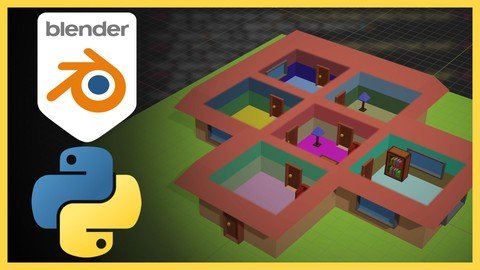
Published 2/2023
MP4 | Video: h264, 1280x720 | Audio: AAC, 44.1 KHz
Language: English | Size: 1.82 GB | Duration: 3h 15m
Creating procedurally generated house with Blender & Python
What you'll learn
Use the scripting section in Blender to create a procedurally generated scene.
Use Object Oriented Programming with python and use it as helping tool to design models
Import external models in blender with python
Use of linked lists and recursive operations
Use NumPy and PyPlot to plot points in a cartesian plane
Export the scene to use it in Godot
Requirements
Blender 3.X
Be familiar with Python or basic programing. You can follow the videos if you don't have any experience
Optionally Godot to import the Blender scene.
Description
Hello and welcome.If you are a designer or developer who is interested in creating scenes automatically with unique features and the ability to use them in an external application, this course is for you.This course focuses on creating multiple Python scripts that will help us create a house with a multiple number of rooms in it.For this, we will use Blender and its scripting section where we will use Python.With python, we will use basic elements of object-oriented programming to help us create a linked list that we will use as a basis for creating multiple objects that will represent the rooms.Each of the rooms will contain enough information for us to obtain the coordinates and routes to plot a house.This course may be attractive to you because it can help you save time when you are designing scenes with the ability to add your custom elements to the script.In addition, you will have access to the content created during the course.I hope you find the content useful and that you can apply it to your personal projects.Have fun and happy learning.In this course you will learn:Use the scripting section in Blender to create a procedurally generated scene.Use Object Oriented Programming with python and use it as helping tool to design models.Import external models in blender with python.Use of linked lists and recursive operations.Use NumPy and PyPlot to plot points in a cartesian plane.Export the scene to use it in Godot.You will require:Blender 3.X.Be familiar with Python or basic programing. You can follow the videos if you don't have any experience.Optionally Godot to import the Blender scene.
Overview
Section 1: Introduction
Lecture 1 Introduction
Lecture 2 Classes and objects
Lecture 3 Linked list
Lecture 4 Recursion
Lecture 5 Defining the class
Lecture 6 Implementing linked list
Lecture 7 Implementing traverse
Lecture 8 Implementing find
Lecture 9 Add function customization
Lecture 10 Implementing the Class. Pt 1
Lecture 11 Implementing the Class. Pt 2
Lecture 12 Using PyPlot
Lecture 13 Plotting the rooms
Lecture 14 Preparing the code for Blender
Lecture 15 Implementing the code in Blender
Section 2: Room class
Lecture 16 Defining the Room class
Lecture 17 Create New Instance
Lecture 18 Constants values
Lecture 19 Implementing add function
Lecture 20 Customizing the add function
Lecture 21 Connecting the rooms. Pt 1
Lecture 22 Connecting the rooms. Pt 2
Lecture 23 Cardinal directions
Section 3: House class
Lecture 24 Defining the House class
Lecture 25 Using iterators
Lecture 26 Building the rooms
Lecture 27 Constants values
Lecture 28 Entrance and exit. pt 1
Lecture 29 Entrance and exit. pt 2
Lecture 30 Entrance and exit. pt 3
Lecture 31 Misc functions
Lecture 32 Entrance and exit doors
Section 4: Plotting with PyPlot
Lecture 33 Implementing the house with Pyplot
Lecture 34 Plotting the house
Section 5: Code into blender
Lecture 35 Preparing the code for Blender
Lecture 36 Importing external figures
Lecture 37 Random material and empty figure
Lecture 38 Implementing the house class
Lecture 39 Getting boundbox size
Lecture 40 Inserting the rooms
Lecture 41 Grouping into one figure
Lecture 42 Implementing the code in blender
Section 6: Implementing details
Lecture 43 Outside ground
Lecture 44 Implementing ground code
Lecture 45 Roof - Ceiling
Lecture 46 Implementing roof code
Lecture 47 Doors and windows
Lecture 48 Implementing doors and windows code
Section 7: Working with bmesh
Lecture 49 Boolean mod
Lecture 50 Implementing boolean mod
Lecture 51 Furniture
Lecture 52 Implementing furniture code
Lecture 53 Solidify and bevel mod
Lecture 54 Implementing solidify and bevel mod
Section 8: Code performance
Lecture 55 Performance test. Pt 1
Lecture 56 Performance test. Pt 2
Lecture 57 Performance test. Pt 3
Lecture 58 Performance test. Pt 4
Section 9: Exporting
Lecture 59 Exporting to glTF 2.0
Section 10: Extra. Godot
Lecture 60 Importing the model
Lecture 61 Adding the physics
Lecture 62 Adding the player
Lecture 63 Testing
Lecture 64 First person view
Section 11: Extra. Godot Performance
Lecture 65 Performance test. 900 Rooms
Section 12: End
Lecture 66 Final message
3D designers or programmers who want to automate tasks to create complex 3D scenes.
Homepage
https://www.udemy.com/course/procedurally-generated-house-with-blender-python/DOWNLOAD LINK
Fikper
kvcia.Procedurally.Generated.House.With.Blender..Python.part1.rar.html
kvcia.Procedurally.Generated.House.With.Blender..Python.part2.rar.html
Rapidgator
kvcia.Procedurally.Generated.House.With.Blender..Python.part2.rar.html
kvcia.Procedurally.Generated.House.With.Blender..Python.part1.rar.html
Uploadgig
kvcia.Procedurally.Generated.House.With.Blender..Python.part2.rar
kvcia.Procedurally.Generated.House.With.Blender..Python.part1.rar
NitroFlare
kvcia.Procedurally.Generated.House.With.Blender..Python.part2.rar
kvcia.Procedurally.Generated.House.With.Blender..Python.part1.rar
Links are Interchangeable - No Password - Single Extraction
See full article