3Ds Max & Vray Advanced Arch Viz Interior Projects
Date: 30 January 2023 | Posted by: voska89
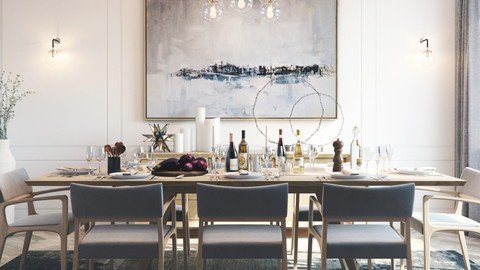
Last updated 3/2022
MP4 | Video: h264, 1280x720 | Audio: AAC, 44.1 KHz
Language: English | Size: 3.72 GB | Duration: 8h 35m
Use 3ds Max, Vray and Marvelous Designer tools to create advanced models, textures, lighting and an overall rendering.
What you'll learn
Use the provided project to create a photorealistic interior rendering using advanced techniques with 3ds Max + Vray
Learn the necessary tools, tips and tricks to make your images really stand out as professional & photorealistic.
Model custom furniture using Polygon tools and other 3ds Max tools
Model cloth objects using cloth simulation in Marvelous Designer
Understand how to use all the settings of the 3ds Max Physical Camera in order to improve composition
Achieve perfect light exposure for your renderings
Use Vray lights, including HDRI dome lights, to create natural looking lighting to achieve photorealism
UVW mapping for complex models
Create custom advanced textures / materials in Photoshop and Vray to achieve photorealism
Understand Vray settings that contribute to photorealism, speed and quality
Experiment with atmospherics, lens flare and light bloom, all within 3ds Max / Vray to enhance your scenes
Make your image pop with professional post-processing techniques in Photoshop
Requirements
You should have a working knowledge of 3ds Max basic tools and UI
Basic Understanding of Vray is helpful but not completely necessary
Basic knowledge of 3d graphics principles like modeling, lighting, textures, rendering, etc.
This is not an entry level 3d course
Description
Where This Course Will Take You
This course takes you beyond basic tools in 3ds Max, and into the world of high-end architectural (arch viz) imagery. You will learn the professional workflow and tools that are used in the industry to achieve stunning, photorealistic results in 3d. Industry standard tools including 3ds Max, Vray, Marvelous Designer and Photoshop are all used and demonstrated.
Project Files
Follow along with the various parts of the project that are provided for you and create a professional arch viz interior by the end. Along the way you will have learned all sorts of tips and tricks, workflow techniques, and tools in advanced software packages, all while creating your own custom rendered scene to add to your portfolio.
Join Now For Lifetime Access to All Project Files and Future Updates
If you are ready to take your renderings to the next level with all the professional tools and techniques, this is the class for you. Join today and you will gain immediate, lifetime access to all course models, textures, etc., plus all the professional lectures that you need to increase your skills.
A couple of things to note
This course is taught by a practicing professional in the arch viz industry (12 years experience)The instructor has over 36,000 students and an average 4.3 rating on 9 available coursesThe course uses the latest software versions, and will be continually updated as software evolvesThe course will also be updated with additional lectures and content regarding new techniques30 day money back guarantee from Udemy if the class is not what you expected
So, what are you waiting for? Join now for immediate, lifetime access to all content!
Overview
Section 1: Course Introduction
Lecture 1 Introduction
Lecture 2 Is This Course Right For You?
Lecture 3 Stay Connected With Your Instructor
Lecture 4 All Course Resources, Plus Student Q&A
Section 2: Advanced Modeling For Architecture in 3ds Max
Lecture 5 Let's Get Started
Lecture 6 Download Resources and Follow Along
Lecture 7 Model the Wall Panels Using Edit Poly Tools
Lecture 8 Model a High Detail Plank Wood Floor
Lecture 9 Model a High-Poly Window - Part 1
Lecture 10 Model a High-Poly Window - Part 2
Lecture 11 Model a Detailed Piece of Modern Furniture - Part 1
Lecture 12 Model a Detailed Piece of Modern Furniture - Part 2
Lecture 13 Model a Detailed Piece of Modern Furniture - Part 3
Lecture 14 Learn More Modeling Tools By Creating a Home Decor Model
Section 3: Intro to Marvelous Designer for Creating Organic 3d Models
Lecture 15 Marvelous Designer - Where / How Do I Get It?
Lecture 16 Marvelous Designer: Model a Cushion While Being Introduced to the Basic Tools
Lecture 17 Model Naturally Folding Curtains for Your Scene Using Marvelous Designer
Lecture 18 Easily Create a Highly Realistic Rug Using Marvelous Designer
Section 4: Modeling Wrap Up
Lecture 19 Final Modeling Tip
Lecture 20 Modeling Review + Links To The Models I Used
Lecture 21 EXTRA: Download Free Additional Furniture
Section 5: Cameras and Composition
Lecture 22 Photography Theory: Basic Terms Explained
Lecture 23 Learn Good Composition From The Pros
Lecture 24 All 3ds Max Physical Camera Settings Explained
Section 6: Advanced Lighting Using Vray Lights
Lecture 25 Use a Material Override Rendering to Figure Out Lighting
Lecture 26 Use an HDRI Light Source For an Extremely Realistic Scene
Lecture 27 Add Interior Light to Your Scene With Vray Lights
Section 7: Advanced Materials
Lecture 28 Learn From Expertly Created Materials
Lecture 29 UVW Mapping for Our Furniture Model
Lecture 30 Create Your Own Photoreal, Tileable Maps in Photoshop
Lecture 31 Generate Your Other Maps - Reflection, Bump, Etc.
Lecture 32 Create a Photorealistic Vray Material
Lecture 33 Stainless Steel Material
Section 8: Advanced Rendering
Lecture 34 Vray Render Settings -- What You Need To Know
Lecture 35 Linear Workflow, Color Adjustments, Lens Flare, etc. Vray Frame Buffer Explained
Section 9: Atmospherics
Lecture 36 Vray Environment Fog
Section 10: Advanced Post-Processing
Lecture 37 Using Your Render Channels in Photoshop CC
Lecture 38 Create Light Bloom in Photoshop
Lecture 39 Apply Final Image Enhancements
Section 11: V-Ray Updates for V-Ray 5 and Above
Lecture 40 V-Ray 5 New Features
Lecture 41 V-Ray 5 Update 2 New Features
Lecture 42 V-Ray Cosmos and Material Library
Section 12: Interior Project II With Latest V-Ray Features
Lecture 43 Download and Explore My Model
Lecture 44 Introduction to V-Ray Cosmos
Lecture 45 Setup Camera and Lighting
Lecture 46 Depth of Field
Lecture 47 Introduction to V-Ray Lightmix
Lecture 48 Composing a Shot (Think Like a Photographer)
Lecture 49 Lens Effects and Post-Processing With The New V-Ray Frame Buffer
Lecture 50 More Composition
Lecture 51 Staging Your Scene With Cosmos Assets
Lecture 52 Exterior Lighting
Lecture 53 My Finished Scene
Lecture 54 Generate Your Finished Renderings
Lecture 55 Post-Processing Using Photoshop and Camera RAW Filter
Lecture 56 Looking At One More Camera Angle
Section 13: ADDITIONAL PROJECTS
Lecture 57 The Easiest Way To Wrap Your Head Around UVW Unwrapping
Lecture 58 Using Marvelous Designer and ReTopo Tools To Make Perfect Cushions
Section 14: EXTRA: Where To Go From Here
Lecture 59 What Should You Learn Next?
People who have learned 3ds Max, but now want to master it with high-end architectural imagery,Those who want to achieve photorealism,Those who want to better understand the workflow involved with making stunning, high-end arch viz imagery
Homepage
https://www.udemy.com/course/3ds-max-vray-advanced-arch-viz-interiors-tutorial/DOWNLOAD LINK
Fikper
mtkvp.3Ds.Max..Vray.Advanced.Arch.Viz.Interior.Projects.part1.rar.html
mtkvp.3Ds.Max..Vray.Advanced.Arch.Viz.Interior.Projects.part2.rar.html
mtkvp.3Ds.Max..Vray.Advanced.Arch.Viz.Interior.Projects.part3.rar.html
mtkvp.3Ds.Max..Vray.Advanced.Arch.Viz.Interior.Projects.part4.rar.html
Rapidgator
mtkvp.3Ds.Max..Vray.Advanced.Arch.Viz.Interior.Projects.part1.rar.html
mtkvp.3Ds.Max..Vray.Advanced.Arch.Viz.Interior.Projects.part2.rar.html
mtkvp.3Ds.Max..Vray.Advanced.Arch.Viz.Interior.Projects.part3.rar.html
mtkvp.3Ds.Max..Vray.Advanced.Arch.Viz.Interior.Projects.part4.rar.html
Uploadgig
mtkvp.3Ds.Max..Vray.Advanced.Arch.Viz.Interior.Projects.part1.rar
mtkvp.3Ds.Max..Vray.Advanced.Arch.Viz.Interior.Projects.part2.rar
mtkvp.3Ds.Max..Vray.Advanced.Arch.Viz.Interior.Projects.part3.rar
mtkvp.3Ds.Max..Vray.Advanced.Arch.Viz.Interior.Projects.part4.rar
NitroFlare
mtkvp.3Ds.Max..Vray.Advanced.Arch.Viz.Interior.Projects.part1.rar
mtkvp.3Ds.Max..Vray.Advanced.Arch.Viz.Interior.Projects.part2.rar
mtkvp.3Ds.Max..Vray.Advanced.Arch.Viz.Interior.Projects.part3.rar
mtkvp.3Ds.Max..Vray.Advanced.Arch.Viz.Interior.Projects.part4.rar
Links are Interchangeable - No Password - Single Extraction
See full article