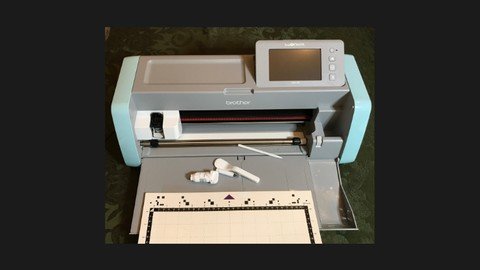
Brother Scanncut Sdx125
Date: 21 January 2023 | Posted by: voska89
Last updated 11/2019
MP4 | Video: h264, 1280x720 | Audio: AAC, 44.1 KHz
Language: English | Size: 9.08 GB | Duration: 7h 41m
Enhance your Crafting Skills
What you'll learn
You will be able to use your Brother ScanNCut SDX125 right out of the box.
You will be able to use the built-in patterns to create shapes, layers for cards and embellishments.
You will cut a variety of materials and be able to change the settings on the SDX125 as needed.
You will be able to scan and cut patterned paper, stamped images and drawings.
You will be able to transfer and cut project files from Brother Canvas Workspace.
Requirements
No previous crafting experience is necessary.
A Brother ScanNCut SDX125 or the curiosity to learn more about the machine.
You will need several types of materials to cut including patterned paper, card stock, and vinyl.
Description
Would you like to take your crafting skills to a whole new level with the help of your Brother ScanNCut SDX125? This course is loaded with practical examples and projects. Follow along using your materials and then practice what you learn. The course never expires so there will be chances to review the material again as you want to try the skills you learn. I encourage you to share your work with other students in the course. Feel free to interact with the course content, to ask questions and to share your experiences with your ScanNCut. I look forward to embarking on this crafty adventure with you. The Brother ScanNCut SDX course covers the following topics:SDX125 SettingsCutting out PatternsCutting Stamped ImagesUsing Scan to Cut DataCutting Patterned PaperSaving and Retrieving FilesWireless Setup Canvas Workspace ProjectsDrawing with your ScanNCutEmbossing with your ScanNCut Cutting Vinyl with your ScanNCut
Overview
Section 1: Introduction
Lecture 1 Course Introduction
Lecture 2 An Overview of the Course Projects
Lecture 3 Getting to Know your ScanNCut SDX125
Lecture 4 SDX125 Settings - Part 1
Lecture 5 SDX125 Settings - Part 2
Lecture 6 SDX125 Settings - Part 3
Section 2: Getting Started Guide - Creating the Welcome Project
Lecture 7 Drawing a Pattern
Lecture 8 Cutting a Pattern
Lecture 9 Assembling the Project
Section 3: Working with Built in Patterns
Lecture 10 Cutting out Patterns
Lecture 11 Editing Patterns
Lecture 12 Selecting, Grouping, and Aligning Patterns
Lecture 13 Using Background Scan when Cutting out a Pattern
Lecture 14 Welding, Saving and Retrieving Patterns
Section 4: Scanning and Cutting Stamped Images
Lecture 15 Stamping Images and Attaching the Card Stock to the Mat
Lecture 16 Using Direct Cut to Scan and Cut Stamped Images
Lecture 17 Coloring Stamped Images with Blends
Lecture 18 Cutting a Stamped Sentiment
Lecture 19 Layering a Stamped Sentiment
Lecture 20 Tips & Tricks - Scanning Cutting Position Adjustment
Lecture 21 Tips & Tricks - Ignore Object Size
Section 5: Scanning and Cutting Patterned Paper
Lecture 22 Cutting Patterned Paper - Introduction - Cutting Large Patterns - Dinoroar
Lecture 23 Cutting Patterned Paper - Cutting Large Patterns - Follow Your Art
Lecture 24 Cutting Patterned Paper - Troubleshooting Tips - Follow Your Art
Lecture 25 Cutting Patterned Paper - Embellishing Projects - Follow your Art
Lecture 26 Cutting Patterned Paper - Creating Layers - Magnolia Lane
Lecture 27 Cutting Patterned Paper - Using Layered Embellishments on Cards - Magnolia Lane
Section 6: Using Scan to Cut Data
Lecture 28 Enlarging a Stamped Image using Scan to Cut Data - Happy Tails
Lecture 29 Enlarging a Die using Scan to Cut Data - Colorful Seasons
Lecture 30 Scanning the Inside and Outside of a Stamped Image - Cuckoo for You
Section 7: Wireless Setup
Lecture 31 Wireless Settings on your SDX125
Lecture 32 Registering for Canvas Workspace
Lecture 33 Connecting and Updating the SDX125
Lecture 34 Transferring a File from Canvas Workspace
Lecture 35 Retrieving a File from Canvas Workspace
Section 8: Brother Canvas Workspace
Lecture 36 Registering for Canvas Workspace
Lecture 37 Canvas Workspace Project - Trunk Part 1
Lecture 38 Canvas Workspace Project - Trunk Part 2
Lecture 39 Canvas Workspace Project - Trunk Part 3
Lecture 40 Canvas Workspace Project - Mini Box or Envelope Part 1
Lecture 41 Canvas Workspace Project - Mini Box or Envelope Part 2
Section 9: Drawing with the Brother ScanNCut SDX125
Lecture 42 Using the Drawing Function with a Built in Font - Personalized Dinosaur
Lecture 43 Drawing a Fill Pattern - Star Project
Lecture 44 Using the Universal Pen Holder - Personalized Tag - Part 1
Lecture 45 Using the Universal Pen Holder - Personalized Tag - Part 2
Lecture 46 Modifying a Pen to Fit the Universal Pen Holder - Silver Lined Bat Project
Section 10: Line Embossing with the ScanNCut SDX125
Lecture 47 The Contents of Brother ScanNCut Embossing Starter Kit
Lecture 48 Premium Embossing Function Activation on Canvas Workspace
Lecture 49 Adding Offset Lines and Transferring a File
Lecture 50 Retrieving a File and Line Embossing a Snowflake
Lecture 51 Cutting an Embossed Snowflake
Lecture 52 Cutting the Background for the Snowflake
Section 11: Cutting Vinyl with the ScanNCut SDX125
Lecture 53 Introduction to Using Vinyl
Lecture 54 Using Canvas Workspace for the PC
Lecture 55 Cutting Vinyl using the Half Cut Setting
Section 12: Downloading an SVG File and Creating a Card
Lecture 56 Locating, Downloading, Opening and Transferring an SVG File
Lecture 57 Retrieving and Cutting an SVG File
Lecture 58 Creating Card Bases for the SVG Card Project
Lecture 59 Stamping and Embellishing your Card
Section 13: Mini Calendar Project
Lecture 60 Creating and Downloading a Calendar
Lecture 61 Creating a Mini Calendar Template
Lecture 62 Retrieving a Saved File and Background Scanning
Lecture 63 Creating Panels for your Mini Calendar
Lecture 64 Assembling and Embellishing your Mini Calendar
Section 14: Conclusion
Lecture 65 Course Conclusion
Crafters who own a SDX125 a ScanNCut and never took it out of the box.,Crafters who are interested in learning how the Brother ScanNCut SDX125 can take their crafting skills to a new level.,Brother ScanNCut SDX125 owners who want to make the most out of their machine.
Homepage
https://www.udemy.com/course/brother-scanncut-sdx125/DOWNLOAD LINK
Fikper
tecct.Brother.Scanncut.Sdx125.part01.rar.html
tecct.Brother.Scanncut.Sdx125.part02.rar.html
tecct.Brother.Scanncut.Sdx125.part03.rar.html
tecct.Brother.Scanncut.Sdx125.part04.rar.html
tecct.Brother.Scanncut.Sdx125.part05.rar.html
tecct.Brother.Scanncut.Sdx125.part06.rar.html
tecct.Brother.Scanncut.Sdx125.part07.rar.html
tecct.Brother.Scanncut.Sdx125.part08.rar.html
tecct.Brother.Scanncut.Sdx125.part09.rar.html
tecct.Brother.Scanncut.Sdx125.part10.rar.html
Rapidgator
tecct.Brother.Scanncut.Sdx125.part01.rar.html
tecct.Brother.Scanncut.Sdx125.part02.rar.html
tecct.Brother.Scanncut.Sdx125.part03.rar.html
tecct.Brother.Scanncut.Sdx125.part04.rar.html
tecct.Brother.Scanncut.Sdx125.part05.rar.html
tecct.Brother.Scanncut.Sdx125.part06.rar.html
tecct.Brother.Scanncut.Sdx125.part07.rar.html
tecct.Brother.Scanncut.Sdx125.part08.rar.html
tecct.Brother.Scanncut.Sdx125.part09.rar.html
tecct.Brother.Scanncut.Sdx125.part10.rar.html
Uploadgig
tecct.Brother.Scanncut.Sdx125.part01.rar
tecct.Brother.Scanncut.Sdx125.part02.rar
tecct.Brother.Scanncut.Sdx125.part03.rar
tecct.Brother.Scanncut.Sdx125.part04.rar
tecct.Brother.Scanncut.Sdx125.part05.rar
tecct.Brother.Scanncut.Sdx125.part06.rar
tecct.Brother.Scanncut.Sdx125.part07.rar
tecct.Brother.Scanncut.Sdx125.part08.rar
tecct.Brother.Scanncut.Sdx125.part09.rar
tecct.Brother.Scanncut.Sdx125.part10.rar
NitroFlare
tecct.Brother.Scanncut.Sdx125.part01.rar
tecct.Brother.Scanncut.Sdx125.part02.rar
tecct.Brother.Scanncut.Sdx125.part03.rar
tecct.Brother.Scanncut.Sdx125.part04.rar
tecct.Brother.Scanncut.Sdx125.part05.rar
tecct.Brother.Scanncut.Sdx125.part06.rar
tecct.Brother.Scanncut.Sdx125.part07.rar
tecct.Brother.Scanncut.Sdx125.part08.rar
tecct.Brother.Scanncut.Sdx125.part09.rar
tecct.Brother.Scanncut.Sdx125.part10.rar
Links are Interchangeable - No Password - Single Extraction
See full article