Interior Architecture Visualization In Blender
Date: 17 January 2023 | Posted by: voska89
Published 1/2023
MP4 | Video: h264, 1280x720 | Audio: AAC, 44.1 KHz
Language: English | Size: 3.79 GB | Duration: 4h 6m
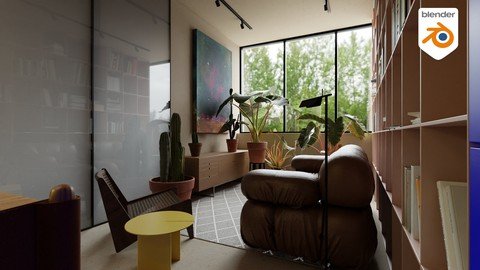
Create realistic interior archviz with blender
What you'll learn
Know how blender is really powerful even if it's a free & open source software
Learn how to create archviz
achieve photorealism in blender
Complete this course to have the possibility to make your own
Requirements
You need to be familiar with blender beginner skills
Download blender for the official website
Description
In this 4 Hours tutorial series, you will learn how to create interior architecture visualization in blender using free open source software but powerful.In this tutorial, I will show you all my workflow used to create this shot, starting with modeling and finishing with post-productionIn this project, we will create the full scene using real-image references from a project called "Flat 2" designed by a studio called "unnamed", you can visit their page and see their amazing work.TUTORIAL SERIES CHAPTERS:Chapter 01 - IntroductionChapter 02 - ModelingChapter 03 - UVsChapter 04 - TexturingChapter 05 - Assets placementChapter 06 - CompositionChapter 07 - Render settingsChapter 08 - LightingChapter 09 - PostproductionDIFFICULTY: BEGINNER to INTERMEDIATEIt would definitely help to have some familiarity with the basic Blender interface and tools. If you have JUST begun using Blender then we would recommend watching any beginner course to get yourself properly acquainted first.NOTES:if you want to get Free assets, these resources can benefit you:Chocofur Free stuffImeshh Free stuffPoliigon Free stuff: textures & modelsQuixel megascansPolyhaven & Ambientcg"3d model made by reference. Original project"Licenses"3d models made by reference Original projects"Models are provided under a CC-BY 4.0 International licenseThe intellectual property depicted in these models, including the brands, is not affiliated with or endorsed by the original rights holders and must be used under editorial use restrictions.BENIANUS 3D does not own the other party's intellectual property, like the design of the Items, the original manufactured products under a brand name, these are under the owner's property. It's solely your responsibility how you determine to use the Items from BENIANUS 3D, if you have any other party consent, clearance, or release to use any other party intellectual property in your projects.
Overview
Section 1: Chapter 01 - Introduction
Lecture 1 Part 00 - Introduction
Lecture 2 Part 01 - Scale object
Section 2: Chapter 02 - Modeling
Lecture 3 Part 02 - Walls modeling
Lecture 4 Part 03 - Windows & Doors modeling
Lecture 5 Part 04 - Fixes
Lecture 6 Part 05 - Books shelf & cloth cabinet modeling
Lecture 7 Part 06 - Kitchen modeling
Lecture 8 Part 07 - Bathroom modeling
Lecture 9 Part 08 - Bedroom assets modeling
Section 3: Chapter 03 - UVs
Lecture 10 Part 09 - Be organized
Lecture 11 Part 10 - UVs
Section 4: Chapter 04 - Texturing
Lecture 12 Part 11 - Floor texturing
Lecture 13 Part 12 - Walls texturing
Lecture 14 Part 13 - Glass texture
Lecture 15 Part 14 - Assets texturing
Lecture 16 Part 15 - Ceiling emission shader
Section 5: Chapter 05 - Assets placement
Lecture 17 Part 16 - Assets placement
Section 6: Chapter 06 - Composition
Lecture 18 Part 17 - Camera & composition
Section 7: Chapter 07 - Render settings
Lecture 19 Part 18 - Cycles render settings
Section 8: Chapter 08 - Lighting
Lecture 20 Part 19 - Lighting
Section 9: Chapter 09 - Postproduction
Lecture 21 Part 20 - Post_production
Beginner & intermidiate blender users curious about learning archviz
Homepage
https://www.udemy.com/course/interior-architecture-visualization-in-blender/DOWNLOAD LINK
Download from Fikper
https://fikper.com/BO1mSbL4Rh/qsxqh.Interior.Architecture.Visualization.In.Blender.part1.rar[/url].html
https://fikper.com/OYinU6FYP3/qsxqh.Interior.Architecture.Visualization.In.Blender.part2.rar[/url].html
https://fikper.com/FTTMIfRTzH/qsxqh.Interior.Architecture.Visualization.In.Blender.part3.rar[/url].html
https://fikper.com/s9fUvuzizV/qsxqh.Interior.Architecture.Visualization.In.Blender.part4.rar[/url].html

https://rapidgator.net/file/bafddf0bfb6b629a59ed00f3b4f7856c/qsxqh.Interior.Architecture.Visualization.In.Blender.part1.rar.html
https://rapidgator.net/file/dbe64a6e85ae717f041a6dcde863707d/qsxqh.Interior.Architecture.Visualization.In.Blender.part2.rar.html
https://rapidgator.net/file/e4d6074800e2f4969a16e1d340a48d38/qsxqh.Interior.Architecture.Visualization.In.Blender.part3.rar.html
https://rapidgator.net/file/735ed89ab9ad12bb8250b0134c0586f6/qsxqh.Interior.Architecture.Visualization.In.Blender.part4.rar.html

https://uploadgig.com/file/download/c991c5e75710fE50/qsxqh.Interior.Architecture.Visualization.In.Blender.part1.rar
https://uploadgig.com/file/download/84641aC76b09f8E6/qsxqh.Interior.Architecture.Visualization.In.Blender.part2.rar
https://uploadgig.com/file/download/c7e376e8cBabb2c9/qsxqh.Interior.Architecture.Visualization.In.Blender.part3.rar
https://uploadgig.com/file/download/377a56BB7ee8459C/qsxqh.Interior.Architecture.Visualization.In.Blender.part4.rar

https://nitroflare.com/view/C0F4818E13475AE/qsxqh.Interior.Architecture.Visualization.In.Blender.part1.rar
https://nitroflare.com/view/E8C1B534C9616A2/qsxqh.Interior.Architecture.Visualization.In.Blender.part2.rar
https://nitroflare.com/view/EFD0335D452625E/qsxqh.Interior.Architecture.Visualization.In.Blender.part3.rar
https://nitroflare.com/view/EB14AA5C52A62A0/qsxqh.Interior.Architecture.Visualization.In.Blender.part4.rar
Links are Interchangeable - No Password - Single Extraction
See full article