Digital Painting For Cartoon Characters
Date: 31 August 2022 | Posted by: voska89
Last updated 1/2019
MP4 | Video: h264, 1280x720 | Audio: AAC, 44.1 KHz
Language: English | Size: 1.66 GB | Duration: 4h 8m
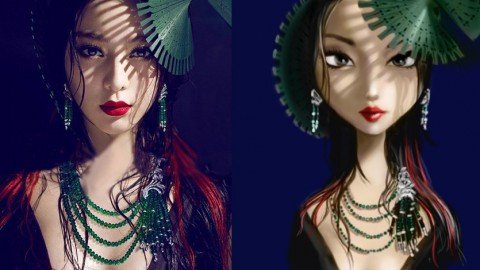
Learn how to draw and paint characters in a cartoon style in Adobe Photoshop.
What you'll learn
Use Adobe Photoshop for illustration and digital painting
Understand the basics of lighting and shading
Apply different techniques for painting digitally
Paint in Grey Scale and apply colours after all shading is done
Requirements
Adobe Photoshop
Pen and Tablet for drawing on the computer
Description
In this course you will cover the very basics of digital painting, starting with how to navigate the interface of Adobe Photoshop, and moving along to more complex techniques. It is essential that if you want to get the best out of this course that you must have a copy of Photoshop, and a pen tablet for your mac/pc. You can find some affordable ones online with a quick search, and if you want to take your art seriously, you should definitely get one! The course starts pretty easy, and builds up fast to keep you entertained whilst also educated at the same time. what's included? Video demonstrations explaining as I paintspeed painting sections to show the full process without skipping any partsPhotoshop files so you can practice all of the steps in the lectures The course will keep growing as I will be adding more content as the days and weeks progress, and will try to cater some of the content to student feedback, so interaction is encouraged!
Overview
Section 1: Photoshop Basics
Lecture 1 Photoshop Basics
Lecture 2 flipping horizontally & using the navigator
Section 2: Basics of Shading
Lecture 3 Painting the ball
Lecture 4 Painting a Cartoon face
Lecture 5 Cleaning up the painting
Section 3: Grey Scale shading and Colour
Lecture 6 Painting the ball in black and white
Lecture 7 Painting a Cartoon Girl in grey scale
Lecture 8 Cleaning up and adjusting the grey scale painting
Lecture 9 Adding Colour to the grey scale image
Lecture 10 Painting over the colours and making adjustments
Lecture 11 Adding some filters and enhancements to the painting
Section 4: Conclusion
Lecture 12 Final thoughts
Section 5: Painting from Photos
Lecture 13 Introduction
Lecture 14 Sketching out our image
Lecture 15 Cleaning up the drawing
Lecture 16 Applying our tones in grey scale
Lecture 17 Rendering and adding definition to the image
Lecture 18 Applying Colour
Lecture 19 Cleaning up our Colours
Lecture 20 Adding some tweaks and final touches
Section 6: Sketching
Lecture 21 silhouette sketching, the head.
Lecture 22 Using silhouettes to create characters
Lecture 23 Turning silhouettes into characters
Lecture 24 Exploring the other characters
Lecture 25 Exploring one character even further
Complete Beginners to digital painting,Students,Hobbyists,Illustrators wishing to learn how to paint digitally
Homepage
https://www.udemy.com/course/digital-painting-for-cartoon-characters/DOWNLOAD LINK

https://rapidgator.net/file/28d361eb8365b57ee2cbdc53f2a3946f/wbdyh.Digital.Painting.For.Cartoon.Characters.part2.rar.html
https://rapidgator.net/file/db0d453a09a9100e1504ea98d04d7203/wbdyh.Digital.Painting.For.Cartoon.Characters.part1.rar.html

https://uploadgig.com/file/download/0eb0db5136158F46/wbdyh.Digital.Painting.For.Cartoon.Characters.part2.rar
https://uploadgig.com/file/download/9bA2c6f0035Cb423/wbdyh.Digital.Painting.For.Cartoon.Characters.part1.rar

https://nitroflare.com/view/543FA84A4F21F4F/wbdyh.Digital.Painting.For.Cartoon.Characters.part2.rar
https://nitroflare.com/view/D9FCCEBD3FA77AA/wbdyh.Digital.Painting.For.Cartoon.Characters.part1.rar
Links are Interchangeable - No Password - Single Extraction
See full article