Unity Tutorial Mastermind 2D
Date: 27 August 2022 | Posted by: voska89
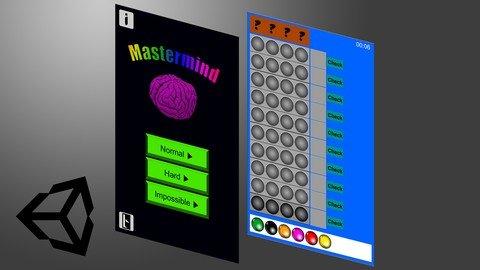
Last updated 1/2019
MP4 | Video: h264, 1280x720 | Audio: AAC, 44.1 KHz
Language: English | Size: 2.59 GB | Duration: 5h 19m
Learn how to create your own 2D Mastermind game with the use of the Unity Engine.
What you'll learn
You will learn how to Drag and Drop 2D Elements using Events in the Canvas.
You will learn about for-loops, arrays and lists in C# and all needed coding basics.
Understand Unity even better.
Complete your maybe very first game.
Requirements
No requirements, but it always helps if you have some basic knowledge about handling Unity.
You should be able to use the keyboard and the mouse on your computer. ;)
A nice bonus, if you are able to create your own Grafics, to stand out from the mass.
Description
In this Unity course you will learn how to create you own Mastermind Game in Unity Engine. You will learn how to write your own Scripts in C#.MotivationIf you are struggling to finish your first game, i will lead you through the process of game creation. You will save a lot time, since i show you everything you need to create your own Mastermind Game.If you are new to game creation i will show you how to structure, and work clean in your maybe first game, which you can show to anyone or even let other people play it.About the GameIf you never heard about Mastermind, it is a combination puzzle game, where the player have to find a random "code" picked by the computer. They have 10 turns to find out the correct combination. They get hints with black and White pearls which showing up.Black Pearl mean, correct pearl on correct position.White Peal means, correct pearl on wrong positon.But they don't know which is meant, so they have to find out that on their own as well.Graphicswill not be covered to muchare available in the corresponding lessons to have material to work withDesign is totally up to you, you can even use your own GraphicsUnityyou will learn about the Inspectorhow the Canvas System workshow to set up GameObjectshow to create Prefabs and what they areC# (Monodevelop)you'll learn about private and public Variablesyou'll learn about List's and Array'syou'll learn about for-loops and nested for-loopsyou'll learn how to create your own functions and neccesary argumentsyou'll learn about Interfaces for Drag and Drop 2D Objectsyou'll learn about if-conditions and expressionsConclusionIn the end of this course you will have a fully functional Mastermind Game in 2D which you can (after you have created nice Menus, Buttons, and maybe additional content) upload to any Gaming Website, Google Playstore, Apple Store or even Windows Store or Steam.Let's make your dream game a reality!!Level: BeginnerVideo Course Length: ~5.5 hoursВ Unity Version required: 4.6+
Overview
Section 1: Introduction
Lecture 1 Introduction
Section 2: Basic Game Elements
Lecture 2 Unity Setup
Lecture 3 Basic Pearl Setup
Lecture 4 Dragging Pearls
Lecture 5 Creating the Playfield
Lecture 6 Updating the Playfield
Lecture 7 Dropping Pearls
Lecture 8 More Pearls and Pearl ID's
Section 3: Game Systems
Lecture 9 Solution Box - Basic Setup
Lecture 10 Solution Box - Scripting #1
Lecture 11 Solution Box - Scripting #2
Lecture 12 Adding Pearls & Fixing Pearls
Lecture 13 The Protector
Lecture 14 Dragging Box
Lecture 15 Hint Box & Check Button
Lecture 16 Set ID's Expression
Lecture 17 Check Button
Lecture 18 Black Hint Pearl Check #1
Lecture 19 Black Hint Pearl Check #2
Lecture 20 White Hint Pearl Check
Lecture 21 Game Manager #1
Lecture 22 Game Manager #2
Lecture 23 Basic Win & Lose Conditions
Lecture 24 Win & Lose Protector
Lecture 25 Show & Hide Solution Box
Lecture 26 Coding Show Solution Box
Section 4: Ingame Metrics
Lecture 27 Win & Lose Panel
Lecture 28 Talking to the Textfields
Lecture 29 Show Win Panel
Lecture 30 Play Timer
Lecture 31 Win Panel Buttons
Lecture 32 Calculating Score
Section 5: Menus, Modes, Fixes, Cleanup
Lecture 33 Menu Scene & Navigation
Lecture 34 Creating a Harder Game Mode
Lecture 35 Creating another even Harder Mode
Lecture 36 Cleaning Up
Lecture 37 Menu Buttons
Lecture 38 Updating HideImage
Section 6: Conclusion & Bonus
Lecture 39 Conclusion
You are a beginner in working with Unity.,You want to get your own, maybe first, game done.,You are a game addict and want to create Mastermind.,You want to learn and understand how such games are made.
Homepage
https://www.udemy.com/course/unity-tutorial-mastermind-2d/DOWNLOAD LINK

https://rapidgator.net/file/64e523a143ab8d5f0601023a9bd74849/tnprs.Unity.Tutorial.Mastermind.2D.part3.rar.html
https://rapidgator.net/file/65c7c974e12a47175324accf2326aeab/tnprs.Unity.Tutorial.Mastermind.2D.part2.rar.html
https://rapidgator.net/file/8eb0e04e13a67e93a4f94d01a0eccac3/tnprs.Unity.Tutorial.Mastermind.2D.part1.rar.html

https://uploadgig.com/file/download/6a077c98933d6Bb2/tnprs.Unity.Tutorial.Mastermind.2D.part2.rar
https://uploadgig.com/file/download/71dB5a34C7e7e7E4/tnprs.Unity.Tutorial.Mastermind.2D.part3.rar
https://uploadgig.com/file/download/f23221a5a2f49C85/tnprs.Unity.Tutorial.Mastermind.2D.part1.rar

https://nitroflare.com/view/3914693D04BED66/tnprs.Unity.Tutorial.Mastermind.2D.part3.rar
https://nitroflare.com/view/4462373AADBA35F/tnprs.Unity.Tutorial.Mastermind.2D.part1.rar
https://nitroflare.com/view/DDA6D77FD94C063/tnprs.Unity.Tutorial.Mastermind.2D.part2.rar
Links are Interchangeable - No Password - Single Extraction
See full article