Unity Game Tutorial Match 3 - 3D Game
Date: 27 August 2022 | Posted by: voska89
Last updated 9/2019
MP4 | Video: h264, 1280x720 | Audio: AAC, 44.1 KHz
Language: English | Size: 3.17 GB | Duration: 6h 13m
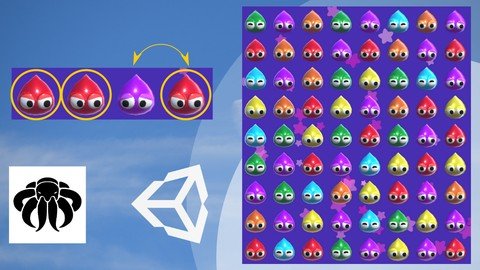
Match 3 Game Tutorial how to create a Match 3 like Candy Crush Saga in Unity 3D Game Engine.
What you'll learn
How to create a Match 3 Game in Unity Game Engine.
C# Fundamentals - Loops, Functions, Variables, Array, Lists ...
Physics and Raycasting.
Requirements
You need a working Mac or Pc.
Unity Version 5.3+
Passion for Games & Game Creation.
The mood to finish the course to create an awesome Game.
Maybe a passion for Match 3 Games.
Description
In this Course you'll learn how to create a Match 3 like the amazing Candy Crush Saga in Unity Game Engine.The concept is based match 3 or more Candys or such in a row or column. We create it as a 3D Game.This course is a Beginner Course, so if you have trouble in any case, write me a message or Q&A, and i'll help as best as i can. If you are beginner, you might have some trouble to follow, but the videos will guide you through the complete course. Don't forget you only become better if you repeat things and keep on learning!So we create several Systems which will give us enough freedom to:C# (Monodevelop)create any board size we likecreate our own Blobbs behaviorscreate a Auto Matching Systemcreate Auto Clear if no Matches are found on the BoardUnity (2018.3)setting up our Blobbs create highlight and background Particlesdesign our own User Interface with Score, matches left and a Star Meterusing Physics for the Blobbs to fall downcreating a Menu and simple Level Select Scene and of course a Game SceneCourse MaterialI provide the following Material with the Course: 3 different Blobbs with animations2 Star Textures and a Border Texture as *.pngYou have to write the code on your own, i do not provide the final scripts!All other graphics for Menu's, Icons, Images or Buttons need to be created on your own.All Materials i provide are for education only and should not be in your final release!ConclusionIn the end of this course you will have a fully functional Match 3 Style 3D Game.ChallengeAfter you have created nice Menus, Buttons, and maybe additional content, upload the Game to any Gaming Website, Google Playstore, Apple Store or even Windows Store or Steam.So what are you waiting for?Let's make your dream game a reality!!Level: Beginner / IntermediateVideo Course Length: ~6 hoursВ Unity Version required: 5.3+
Overview
Section 1: Introduction
Lecture 1 Introduction
Section 2: The Concept & Unity Setup
Lecture 2 The Concept
Lecture 3 Unity Layout
Section 3: The Playfield
Lecture 4 Visualize the Playfield
Lecture 5 The Camera
Lecture 6 Filling the Board
Lecture 7 Setting up all Blobbs
Lecture 8 Fill Board with Blobbs
Section 4: Game Mechanics
Lecture 9 Adding Blobb Physics
Lecture 10 Blobb Selector
Lecture 11 Toggle Selector
Lecture 12 Checking Neighbours
Lecture 13 Swapping Blobbs #1
Lecture 14 Swapping Blobbs #2
Lecture 15 Swapping Blobbs #3
Lecture 16 Finding a Match
Lecture 17 Clearing A Match
Lecture 18 Clearing all Matches
Lecture 19 Destroying Blobbs
Lecture 20 Setting ID's
Lecture 21 Creating New Blobbs
Lecture 22 Swap back if no Match
Section 5: Game Board Mechanics
Lecture 23 Is Board On Move
Lecture 24 Auto Destroy Matches
Lecture 25 Avoid Auto Play
Lecture 26 Block Input while Move
Lecture 27 Check Possible Matches #1
Lecture 28 Check Possible Matches #2
Lecture 29 Check Possible Matches #3
Lecture 30 Check Possible Matches #4
Section 6: User Interface and Score
Lecture 31 GUI 1 - Score Field
Lecture 32 GUI 2 - Matches Field
Lecture 33 UI Handler
Lecture 34 Game Manager 1
Lecture 35 Game Manager 2
Lecture 36 Get Score
Lecture 37 Update Matches
Lecture 38 Win / Lose Condition
Lecture 39 GUI 3 - Star Meter
Lecture 40 Coding The Star Meter
Lecture 41 Star Indicators
Lecture 42 Score Fix
Lecture 43 Win Panel GUI
Lecture 44 Win Panel Script 1
Lecture 45 Win Panel Script 2
Lecture 46 Block Blobbs with UI
Lecture 47 Show Score in Win Panel
Lecture 48 Animating Stars
Lecture 49 Showing Stars
Lecture 50 Stopping the Game
Lecture 51 Particle Background
Section 7: Other Scenes
Lecture 52 Main Scene
Lecture 53 Level Select
Lecture 54 Final Touches
Section 8: Conclusion & Bonus & Requests
Lecture 55 Game Ideas & Thank You
Lecture 56 Extra - Freeze Bug Fix
You want to create a Match 3 Game with Unity.,You want to learn using Unity to create 2D or 3D Games in generell.,You have a passion for Games in general.
Homepage
https://www.udemy.com/course/unity-game-tutorial-match-3-3d-game/DOWNLOAD LINK

https://rapidgator.net/file/744133b769cf8125c1a1ec686ee4999d/gnqeq.Unity.Game.Tutorial.Match.3..3D.Game.part4.rar.html
https://rapidgator.net/file/98833983ddf8a520d5d6429f94ca3312/gnqeq.Unity.Game.Tutorial.Match.3..3D.Game.part3.rar.html
https://rapidgator.net/file/acd79773e86660982430c2b3adfeaed1/gnqeq.Unity.Game.Tutorial.Match.3..3D.Game.part2.rar.html
https://rapidgator.net/file/d96aa61f9c28cd99fb49eca7f667bcdc/gnqeq.Unity.Game.Tutorial.Match.3..3D.Game.part1.rar.html

https://uploadgig.com/file/download/0d6ED99a943ae2bb/gnqeq.Unity.Game.Tutorial.Match.3..3D.Game.part2.rar
https://uploadgig.com/file/download/131a94a2FeEAB1ef/gnqeq.Unity.Game.Tutorial.Match.3..3D.Game.part1.rar
https://uploadgig.com/file/download/69737383058d3875/gnqeq.Unity.Game.Tutorial.Match.3..3D.Game.part4.rar
https://uploadgig.com/file/download/a73330c4EcC1a9d3/gnqeq.Unity.Game.Tutorial.Match.3..3D.Game.part3.rar

https://nitroflare.com/view/13FBDE038116014/gnqeq.Unity.Game.Tutorial.Match.3..3D.Game.part3.rar
https://nitroflare.com/view/91194E5CA14EC97/gnqeq.Unity.Game.Tutorial.Match.3..3D.Game.part4.rar
https://nitroflare.com/view/BA6D2BACC2C8D77/gnqeq.Unity.Game.Tutorial.Match.3..3D.Game.part1.rar
https://nitroflare.com/view/BC689E7712B1B97/gnqeq.Unity.Game.Tutorial.Match.3..3D.Game.part2.rar
Links are Interchangeable - No Password - Single Extraction
See full article