Advanced Texturing Mesh Painting For Games In Unreal
Date: 27 August 2022 | Posted by: voska89
Last updated 9/2016
MP4 | Video: h264, 1280x720 | Audio: AAC, 44.1 KHz
Language: English | Size: 2.11 GB | Duration: 3h 38m
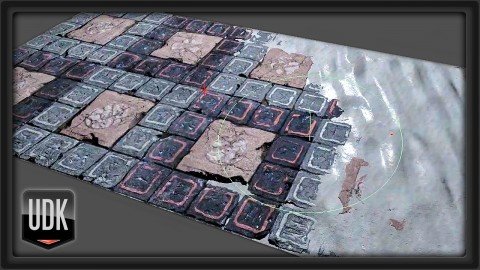
Learn how to paint directly on your game assets in-engine and in real-time with UDK's Mesh Painting tools!
What you'll learn
Learn to use UDK's Mesh Painting tools to paint advanced materials directly onto your game assets
Learn to create blend maps and shaders that add to existing materials on your world objects
Requirements
Photoshop or a similar image editing software
The UDK Game Engine
Description
This tutorial takes an advanced look at UDK's mesh painting features for game art (often called vertex painting). We'll go in-depth on how to create several advanced blending materials such as snow icing over stones, puddles that react to light, and cracked and weathered concrete.
About the Instructor:
Ryan Smith is a Technical Artist at Gearbox Software, who specializes in technical art and visual effects. With over 10 years experience working with the Unreal Engine, he is highly proficient with 3D Studio Max, Photoshop, and Zbrush. His specialties also include Shader Authoring, Visual Effects, Technical Art, MAXScript, and Optimizing Workflows.
Overview
Section 1: Blended materials and Creating Snow
Lecture 1 Introduction
Lecture 2 Advanced Mesh Paint Overview
Lecture 3 Mesh Paint Basics
Lecture 4 Adding a Height Map for Better Transitions
Lecture 5 Mix Maps!
Lecture 6 Hard Surface with Blending Snow Material
Lecture 7 Soft Surface and Hard Surface UV Scales
Lecture 8 Transition and Alpha Blending
Lecture 9 Normal Map Intensity Control
Lecture 10 Vertex Displacement on the Snow
Lecture 11 Environment Map and Color Tint
Lecture 12 Hard Surface with Blending Sand Material
Section 2: Creating Liquid Materials
Lecture 13 Hard Surface to Liquid Transition Material
Lecture 14 Blending Environment Map Based on Lighting
Lecture 15 Transition Using a Wet Map
Lecture 16 Finishing Touches on the Liquid Material
Lecture 17 Turning Water into Blood!
Section 3: Adding Believable Cracks and Height to a Surface
Lecture 18 Entropy Painting Material
Lecture 19 Adding Grime Functionality
Lecture 20 Finishing the Entropy Painting Material and Course Wrapup
Lecture 21 Bonus Lecture: Further Learning with 3dmotive
Advanced students who have a strong understanding of materials and the UDK game engine
Homepage
https://www.udemy.com/course/3dmotive-advanced-mesh-painting-for-games-in-udk/DOWNLOAD LINK

https://rapidgator.net/file/207e228ce25e3f8c4e27c312b983c4d2/snmps.Advanced.Texturing..Mesh.Painting.For.Games.In.Unreal.part3.rar.html
https://rapidgator.net/file/54c9f0fcba1d31c7a04c743efa9f9255/snmps.Advanced.Texturing..Mesh.Painting.For.Games.In.Unreal.part1.rar.html
https://rapidgator.net/file/7f5ec2974d4cc41113f561fdd4fb7179/snmps.Advanced.Texturing..Mesh.Painting.For.Games.In.Unreal.part2.rar.html

https://uploadgig.com/file/download/5ab29297Fcd0ed52/snmps.Advanced.Texturing..Mesh.Painting.For.Games.In.Unreal.part2.rar
https://uploadgig.com/file/download/8e02e68c3f16A740/snmps.Advanced.Texturing..Mesh.Painting.For.Games.In.Unreal.part1.rar
https://uploadgig.com/file/download/bB693585f1518d82/snmps.Advanced.Texturing..Mesh.Painting.For.Games.In.Unreal.part3.rar

https://nitroflare.com/view/01FE1F28D6C8575/snmps.Advanced.Texturing..Mesh.Painting.For.Games.In.Unreal.part1.rar
https://nitroflare.com/view/235C39E85884E9A/snmps.Advanced.Texturing..Mesh.Painting.For.Games.In.Unreal.part3.rar
https://nitroflare.com/view/531DFB5DBC63012/snmps.Advanced.Texturing..Mesh.Painting.For.Games.In.Unreal.part2.rar
Links are Interchangeable - No Password - Single Extraction
See full article