3D Modeling For Video Games Beginners Guide
Date: 27 August 2022 | Posted by: voska89
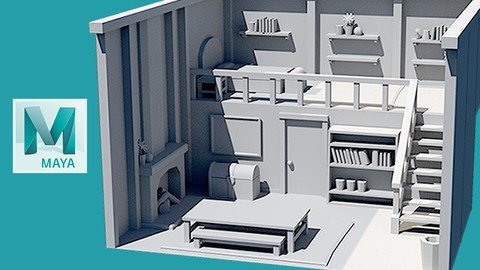
Last updated 3/2019
MP4 | Video: h264, 1280x720 | Audio: AAC, 44.1 KHz
Language: English | Size: 4.67 GB | Duration: 6h 34m
How to make 3D models for games, film, and VFX inside of Maya!
What you'll learn
How to start using Maya to create 3d models for games, movies, and vfx
Requirements
A copy of Maya 2017 or higher
Mouse with scroll wheel
Basic computer skills
Description
Learning how to create 3dВ models can be hard. There are many places where things can go wrong. Trying to follow multiple tutorials about modelingВ can result inВ leavingВ out the most important details or, in the worst case,В give you the wrong information. This can leave you feeling confused about how to modelВ and asking yourselfВ how to even get started.What you want is an industry professional to walk you through the process of creating 3dВ models inside of Maya. You wouldВ haveВ someone to answer your questions about how to create theВ highest quality results possible. Your art and knowledgeВ wouldВ jump in quality, leaving youВ with beautiful art for your portfolio or project.В This course is designed to give you all the skills you need to create beautiful 3DВ models for games, movies or vfx. You will be walked through each step of the learning process from the most simple concepts to more advanced things to be considered when modeling. All the steps have been recorded and narratedВ to give you the skills to not only build the 3DВ models in this course but to buildВ any typeВ of 3D modelВ at the highest quality. By the end of this course you will have the skills to create 3D models for games, movies and vfx.В Now is the time to increase your art ability and really let your true skills come through. So sign up for the course now and have yourself wondering why you ever let yourself struggle at creating 3D modelsВ for your artВ portfolio or project.
Overview
Section 1: Introduction
Lecture 1 Introduction
Section 2: Core Maya Skills Overview
Lecture 2 Maya basic UI overview
Lecture 3 Manipulating the Camera in Maya
Lecture 4 What is the Grid and how do I use it?
Lecture 5 Primitives in Maya : Creating our first 3D geometry
Lecture 6 Move - Rotate - Scale : The core base objects movements
Lecture 7 F Key : How we focus our camera on our models
Lecture 8 WorkShop : Building a Table and Chairs
Lecture 9 Saving and Loading our Content in Maya
Section 3: Model Anatomy
Lecture 10 Vertices , Edges , Faces : The Core Model Components
Lecture 11 Topology and N-Gon : What to Look out for
Lecture 12 Welding Vertices
Lecture 13 What is Tri / Polygon / Vertex Count ?
Lecture 14 Viewing our Tri / Polygon / Vertex Count in the viewport
Lecture 15 Display modes : Different ways to visualize your model
Lecture 16 What are Edge Loops and Edge Rings ?
Section 4: Most Used Modeling Tools
Lecture 17 Intro to mesh tools
Lecture 18 The Extrude Tool
Lecture 19 The Bevel Tool
Lecture 20 The Multi-Cut Tool
Lecture 21 The Connect Tool
Lecture 22 The Bridge Tool
Lecture 23 The Target Weld Tool
Lecture 24 WorkShop : Putting all the tools together
Section 5: Modeling Technical Knowledge Deep Dive
Lecture 25 Pivot Point
Lecture 26 Using Symmetry on your models
Lecture 27 WorkShop: Building a Crate using Symmetry
Lecture 28 Watertight modeling vs Overlapping geometry
Lecture 29 The Different Modeling Spaces ( World, Object, Local )
Lecture 30 Hard vs Soft Edges
Lecture 31 Hard vs Soft Edges Continued
Lecture 32 Face Direction and how to manage it
Lecture 33 Snapping inside of Maya ( Grid, Curves, Vertex, Live Surface )
Lecture 34 How to see only parts of a mesh of a single mesh when editing
Lecture 35 What is Freeze Transform and Why do I need to know it
Lecture 36 How to use Mesh History and why you should delete it
Lecture 37 Using the Outliner and Organizing your 3D assets
Section 6: Workshop : Building Simple Tools
Lecture 38 Making a Stylized Hammer
Lecture 39 Making a Stylized Hammer Continued
Lecture 40 Making a Stylized Axe
Lecture 41 Making a Stylized Saw
Section 7: WORKSHOP: Building a Stylized Fantasy House
Lecture 42 Blocking in and Setting up our Fantasy House
Lecture 43 Adding in the Door and Stairs
Lecture 44 Adding in the Railing and Wall Details
Lecture 45 Propping out the upper bedroom area
Lecture 46 Adding Props to the Shelves upstairs
Lecture 47 Creating the Chest Table and Benches downstairs
Lecture 48 Finishing the Downstairs with a Fireplace and Propping out the Lower Room
Lecture 49 Cleaning up the outliner and renaming objects in our scene
Lecture 50 Setting up our props for export to a game engine or other Maya scene
Section 8: Next Steps
Lecture 51 Recap and Thank you
Beginner to 3D modeling that want to get a solid grasp from a professional.,Junior artists looking to get additional modeling tips and tricks when working with Maya.
Homepage
https://www.udemy.com/course/3d-modeling-for-video-games-beginners-guide/DOWNLOAD LINK

https://rapidgator.net/file/0aeb9207d193c22d92eb58aaa6b6b908/bndur.3D.Modeling.For.Video.Games..Beginners.Guide.part5.rar.html
https://rapidgator.net/file/210c26605851e1abfd76ce159eb83124/bndur.3D.Modeling.For.Video.Games..Beginners.Guide.part2.rar.html
https://rapidgator.net/file/35dc1ad654dd45b264f50e51f4545b7b/bndur.3D.Modeling.For.Video.Games..Beginners.Guide.part1.rar.html
https://rapidgator.net/file/4e87303a903ef01e9bef995bb528fb42/bndur.3D.Modeling.For.Video.Games..Beginners.Guide.part3.rar.html
https://rapidgator.net/file/dadb98845b40bc277619146db2969ec8/bndur.3D.Modeling.For.Video.Games..Beginners.Guide.part4.rar.html

https://uploadgig.com/file/download/01ddC2dEbB2d9081/bndur.3D.Modeling.For.Video.Games..Beginners.Guide.part1.rar
https://uploadgig.com/file/download/052fBcbdA75205a6/bndur.3D.Modeling.For.Video.Games..Beginners.Guide.part3.rar
https://uploadgig.com/file/download/1Ca565693680D3fa/bndur.3D.Modeling.For.Video.Games..Beginners.Guide.part2.rar
https://uploadgig.com/file/download/f2302520f3c005e2/bndur.3D.Modeling.For.Video.Games..Beginners.Guide.part5.rar
https://uploadgig.com/file/download/fa2eC7Efc9c701Cc/bndur.3D.Modeling.For.Video.Games..Beginners.Guide.part4.rar

https://nitroflare.com/view/4F113463CE2D4E6/bndur.3D.Modeling.For.Video.Games..Beginners.Guide.part2.rar
https://nitroflare.com/view/61955A93ACBA6FF/bndur.3D.Modeling.For.Video.Games..Beginners.Guide.part5.rar
https://nitroflare.com/view/839E88842702CD7/bndur.3D.Modeling.For.Video.Games..Beginners.Guide.part3.rar
https://nitroflare.com/view/889F5F160AB8B9E/bndur.3D.Modeling.For.Video.Games..Beginners.Guide.part4.rar
https://nitroflare.com/view/979B5FCD9FD86DE/bndur.3D.Modeling.For.Video.Games..Beginners.Guide.part1.rar
Links are Interchangeable - No Password - Single Extraction
See full article