Sketchup Interior
Date: 20 August 2022 | Posted by: voska89
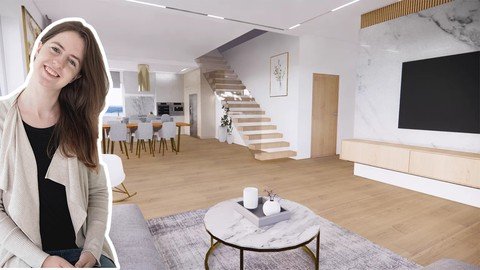
Published 8/2022
MP4 | Video: h264, 1280x720 | Audio: AAC, 44.1 KHz
Language: English | Size: 2.51 GB | Duration: 3h 1m
Create interiors and visualisations in Enscape
What you'll learn
Model efficiently in SketchUp
Create interior project of kitchen, living room, dining room
Learn from a real interior project step by step
Add realistic materials, lights, and create realistic visualisation using Enscape Renderer
Learn how to create animations and panorama 360 using Enscape renderer.
Requirements
Windows PC or Mac
Basic SketchUp knowledge
SketchUp, Enscape software
Willingness to learn awesome things ;)
Description
If you want to create interior project in SketchUp in a very efficient way, this course is just for youDuring the course you will create a kitchen, dining room and living room. You will learn how to model furniture, create materials, set scenes and create visualisations. You will learn how to model new objects very precisely, how to work with tags. You'll create new materials and apply them to groups and components. After the course, you will gain skills to create your own interior projects.Get to know the best program for creating buildings, furniture, interiors now and start working with SketchUp. I can assure you that learning will be a very enjoyable experience that will pay off in the future.- Learn how to work in the best interior design software- Create a kitchen, dining room and living room interiors- Create attractive visualisations in Enscape rendering engine.Why should I choose this course?Learn how to apply SketchUp tool in practice, creating real interior projectYou teacher will be an architect and interior designer which uses the SketchUp for 10 yearsDownload a library with all materials and models, which you can use in your projectsWho this course is for?ArchitectsInterior DesignersInterior design and architecture studentsHobbystsAnyone, which is interested in SketchUp modelling and visualisation
Overview
Section 1: Introduction. Floor, kitchen cabinets.
Lecture 1 Course Materials
Lecture 2 Introduction. Create floor and apply material.
Lecture 3 Modelling a kitchen Using the guidelines.
Lecture 4 Creating a different types of cabinets
Lecture 5 Modelling a plinch for lower cabinet. Navigating the scene.
Section 2: Oven, coffee machine, sink, worktop and handles.
Lecture 6 Importing oven and coffee machine. Creating high cabinets.
Lecture 7 Creating a worktop and a sink.
Lecture 8 Modeling a handles, Making components.
Lecture 9 Importing a fridge, modelling high cabinets.
Section 3: Suspended ceiling, lights, blinds.
Lecture 10 Modelling a suspended ceiling. Setting the LED lighting.
Lecture 11 Window blinds, creating and editing groups.
Section 4: Kitchen island, barstools, tables and chairs
Lecture 12 Creating a kitchen island and ventilation hood. Applying materials to barstools.
Lecture 13 Importing a table and chairs. Creating fabric materials. Importing lights
Section 5: Living room
Lecture 14 Modelling a painting and a frame. Importing image as texture.
Lecture 15 Editing a couch. Scalling and copying elements. Modelling a coffee table.
Lecture 16 Modelling a tv stand. Setting exact distances between elements.
Section 6: Stairs and curtains. Scenes.
Lecture 17 Creating stairs and railings. Modelling holes in the slab.
Lecture 18 Fabric and transparent curtains. Setting up the scenes.
Section 7: Enscape Renderer
Lecture 19 Introduction to Enscape Renderer. Creating materials and visualisations.
Lecture 20 Lights. Creating an animation and panorama 360 degrees.
Architects Anyone, which is interested in SketchUp modelling and visualisation,Interior Designers,Interior design and architecture students,Hobbysts,Anyone, which is interested in SketchUp modelling and visualisation
Homepage
https://www.udemy.com/course/sketchup-interior/DOWNLOAD LINK
Download from UploadCloud
https://www.uploadcloud.pro/usrrx0t2sfjf/pahbk.Sketchup.Interior.part1.rar.html
https://www.uploadcloud.pro/t1vm2n4g61p2/pahbk.Sketchup.Interior.part2.rar.html
https://www.uploadcloud.pro/h71hrueu0jb9/pahbk.Sketchup.Interior.part3.rar.html

https://rapidgator.net/file/6b69d5dc9c5805a4bc272ef8d148af5d/pahbk.Sketchup.Interior.part1.rar.html
https://rapidgator.net/file/e53feaa704d08238020e59c323f75cf0/pahbk.Sketchup.Interior.part2.rar.html
https://rapidgator.net/file/96bd769058bcc76d30d2f7f8655371b9/pahbk.Sketchup.Interior.part3.rar.html

https://uploadgig.com/file/download/db3eedeE088e8458/pahbk.Sketchup.Interior.part1.rar
https://uploadgig.com/file/download/53a82B3e7a54a052/pahbk.Sketchup.Interior.part2.rar
https://uploadgig.com/file/download/e2D89931944ab156/pahbk.Sketchup.Interior.part3.rar

https://nitroflare.com/view/7C34DBC8901CFF6/pahbk.Sketchup.Interior.part1.rar
https://nitroflare.com/view/178516EDEB51FC3/pahbk.Sketchup.Interior.part2.rar
https://nitroflare.com/view/395B335306D6844/pahbk.Sketchup.Interior.part3.rar
Links are Interchangeable - No Password - Single Extraction
See full article