Brusherator 1.8.0 (Win/macOS)
Date: 5 January 2024 | Posted by: voska89
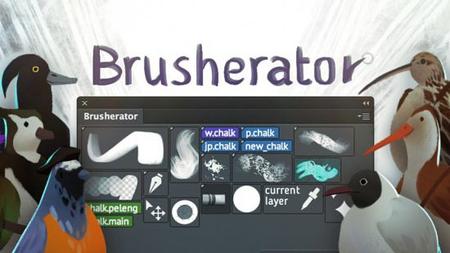
Free Download Brusherator 1.8.0 (Win/macOS) | 18 Mb
Brusherator for Photoshop CC and above! Brushes! On the Panel! Create tiny text buttons, larger auto-generated and custom thumbnail buttons. Keep your Brushes, Tool presets and Actions on a panel. And much more!
Key Features
- Create tiny text buttons, larger auto-generated and custom thumbnail buttons;
- Keep your Brushes, Tool presets and Actions on a panel;
- An additional optional panel for larger previews;
- Brush size is inherited no matter what brush size is in the preset (and this can can be overridden for particular presets);
- Alternatives: a different variant of the preset on the same button;
- Shelves for different tasks;
- Hotkeys to toggle Brusherator visibility and Alternatives;
What is Brusherator?
In few words, it is a Photoshop panel that allows you to have brush and tool presets, actions and scripts on it.
In further detail, Brusherator is a system of several panels and scripts that will allow you to work with high efficiency and speed. It's not a brush manager for you instruments that will spit all the tools you have to you, but rather like a highly customizable surgeon table when you have all the tools you need for particular task in the right places.
- And you can have several tables for different tasks.
- And also you can switch between them in a press of the button.
System Requirements
- Photoshop CC and higher
- CS6 and below aren't supported.
Home Page-
https://kritskiy.gumroad.com/l/brusheratorDOWNLOAD LINK
Links are Interchangeable - No Password - Single Extraction
See full article