AlphaPlugins RichText 1.1
Date: 25 December 2023 | Posted by: oaxino
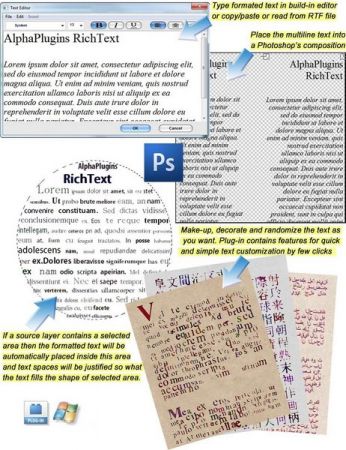
AlphaPlugins RichText 1.1
Languages: English
File Size: 12.52 MB
Languages: English
File Size: 12.52 MB
AlphaPlugins introduces RichText plug-in for Adobe Photoshop and compatible programs. This filter lets you add multi-line text and/or paragraphs to Photoshop compositions and apply effects for impact and interest. Create formatted text using the built-in text editor, copy and paste text from i.e. MSWord or load it from a RTF file. With a variety of powerful, built-in features, RichText makes it easy to add, decorate and randomize text in Photoshop to full effect. If Photoshop's composition has a selection then the formatted text fill be accuratelly filled inside this area.
Simple and powerful
Add multi-line formatted text directly to Photoshop compositions and quickly apply effects for impact.
Easy text imports
For larger amounts of text, use the built-in text editor, copy/paste from another text editor or load text from RTF files.
Brilliant effects
Set parameters for automatic text randomization or choose from a variety of text effects, including seamless paper background.
AlphaPlugins RichText allow
- Edit, place and adjust text in Photoshop compositions.
- Includes built-in text editor for working with large amounts of text.
- Compatible with copy/paste features of other text editors.
- Accepts text from RTF files.
- Use plug-in parameters to set automatic text randomization.
- Choose from a variety of different text effects, including seamless paper texture background.
Release Notes
All our Photoshop's plug-ins were adopted to work with Serif Affinity Photo 2 editor. Now you can choose Affinity plug-ins folder as a destination folder during installation.
System Requirements
- Windows OS 95-2000, XP(32/64Bit), Vista (32/64Bit), Windows 7, Windows 8, 10, 11 or later
- 1.2 GHz processor or higher
- At least 256 megabytes of RAM or more
- Graphics card 16-bit color, and 256MB of VRAM or higher
- 1024 x 768 display or bigger
- Adobe Photoshop CS5 - CC2023 or later
Information
Also you can use Photoshop compatible editors which support Photoshop plug-ins like Corel Photo-Paint, Corel PaintShop Pro, JASC PaintShop Pro, Xara Picture Editor, GIMP, Ulead PhotoImpact and etc.
Homepage:
https://www.alphaplugins.comDownload link
rapidgator.net:
uploadgig.com:
nitroflare.com:
See full article