Hosts File Editor+ 1.5.12 Multilingual
Date: 2 March 2023 | Posted by: oaxino
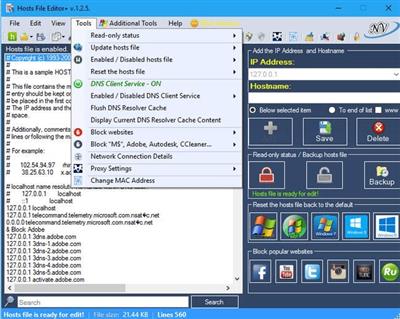
Hosts File Editor+ 1.5.12 Multilingual
File Size: 2.5 MB
File Size: 2.5 MB
The hosts file is a list of computer names and their associated IP addresses. Hosts files are used by Microsoft Windows and other network operating systems as an optional means to redirect TCP/IP traffic in special circumstances. These files are not required to use ordinary network and Internet applications. The hosts file is designed to be edited by a computer administrator, knowledgeable user or automated script program.
The functions of this program
- Add new host ( IP Address and Hostname )
- Delete host
- Save changes
- Change Read-only status (hosts file)
- Backup hosts file
- Restore hosts file from a backup
- Create new hosts file ( If the hosts file does not exist - C:/Windows/System32/drivers/etc/ )
- Import file (.txt)
- Export hosts file
- Add blank row
- Add comment (#)
- Properties (hosts file)
- Search items
- Replace IP ( 127.0.0.1 ---> 0.0.0.0 ; 0.0.0.0 ---> 127.0.0.1 and custom )
- Edit selected comment (#) - (to enable double-click on the item ...)
- Delete duplicates items
- Comment selected
- Delete blank rows
- Delete comment lines
- Enabled / Disabled hosts file
- Enabled / Disabled DNS Client Service
- Block popular websites ( Facebook, Youtube, Twitter...)
- Block Microsoft, Telemetry, Adobe...
- Reset the hosts file back to the default (Windows XP, Windows Vista, Windows 7, Windows 8,
8.1, Windows 10,11 Windows Server)
- Download and install update list (.txt)
- Update hosts file ( install update and uninstall update )
rapidgator.net:
uploadgig.com:
https://uploadgig.com/file/download/55480aa8C9Ab2d83/ynzzd.Hosts.File.Editor.1.5.12.Multilingual.zip
nitroflare.com:
1dl.net:
See full article